

Key Takeaways
- With MCP, AI applications have a standard means of reaching external tools, data, and prompts.
- MCP uses a host-client-server architecture: the host manages the user experience, the client handles communication, and the server accesses the external system.
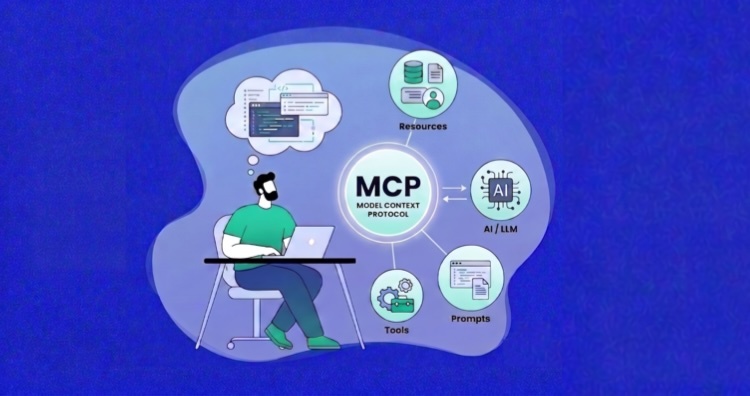
- MCP provides three main capabilities: tools perform actions, resources supply data or context, and prompts provide reusable task templates.
Anyone who has made use of an AI coding assistant is likely familiar with its main drawback. While the tool can make sense of your code, it is unable to access the systems on which that code is running.
It will put forward a solution, make sense of an error, or even write up a deployment script for you, but without the proper connections in place, it is not going to be able to restart a stalled service, have a look at application logs, pull down recent commits, or see how the server is being used.
To close that gap, there is the Model Context Protocol (MCP). With MCP, an assistant is no longer limited to what a developer types into a chat; it can take approved action and source the right information.
This article describes what MCP is, the mechanics of how it functions, and why it is of consequence to developers in the realm of cloud infrastructure and automation.
- What Is MCP (Model Context Protocol)?
- Why Was MCP Created?
- How Model Context Protocol Works
- MCP Capabilities: Tools, Resources, and Prompts
- A Simple Example of MCP in Action
- Using Cloudways MCP to Manage Hosting Servers and Applications
- Why Every Developer Should Know About MCP
- Benefits of MCP
- Limitations of MCP
- Is MCP Secure?
- Getting Started With MCP as a Developer
- Final Thoughts
What Is MCP (Model Context Protocol)?
The Model Context Protocol (MCP) is an open standard for AI applications to interface with external systems in a manner that is both consistent and predictable.
These systems may include:
- Databases
- Files and documents
- APIs
- Code repositories
- Development tools
- Monitoring platforms
- Business applications
- Cloud infrastructure
Consider a coding assistant pulling in repository files or an infrastructure assistant tasked with inspecting server data and app logs; these are typical use cases.
Under MCP, “context” is not limited to what appears in a prompt. It encompasses the sort of external information and capabilities an AI needs to get a job done, from technical documentation and database schemas to repository issues and system operations.
That said, MCP is not intended to substitute the systems it is tied to. A cloud platform will still furnish its infrastructure, a repository will continue to manage code, and a database will do what it does best in storing and processing data. What MCP does is put certain functionality and data at the disposal of a compatible AI application in a consistent manner.
Why Was MCP Created?
Before MCP, a developer working with an AI application and an external service would have to put together a custom integration.
To link an assistant with a database, a project management system, or a hosting platform meant writing distinct code and logic for the job. Add enough AI clients and services into the mix, and the work becomes duplicative; maintenance is complicated by a tangle of fragmented connections.
Often, an integration would be good for one AI assistant, but inefficient for another, even if they were calling the same service, forcing developers to essentially rebuild a tool for similar functionality.
MCP was created to stop that from happening. The protocol allows external systems to make certain data and operations available in a uniform way that any compatible AI application can then consume. Of course, one still has to make the connection to the data sources and underlying APIs. But there is no longer any need to come up with an entirely new model for the AI side of things for every permutation of app and service.
How Model Context Protocol Works
The MCP is built on a host-client-server architecture that governs how an AI application communicates with the systems it must reach.
At a high level, the MCP Server architecture looks like this:

In broad terms, the host oversees the AI experience, the client is responsible for protocol communication, and the server grants access to the system in question.
MCP Host
User interaction with the AI takes place via the host application. Whether it is an AI assistant, an agent platform like Claude Desktop, or a coding environment such as Visual Studio Code with GitHub Copilot or Cursor, this is where a request is put forward, and the MCP process is set in motion.
The host is in charge of the overall experience and of coordinating connections to the relevant MCP servers. A given task may call for the host to link up with several servers to get the necessary tools and data.
MCP Client
To talk with a specific server, the host puts in place an MCP client at the protocol level. This component has a one-to-one relationship with an MCP server; it relays requests and brings back the server’s responses.
By keeping this separate, the host is free to run multiple connections in parallel; a client might be tied to a monitoring platform while another is engaged with a code repository service.
MCP Server
Through the protocol, an MCP server exposes certain functionality or data. It is the interface between the AI and whatever lies beneath it, be that a database, an infrastructure service, or a development platform. The server dictates what is on offer and presents those capabilities in a way the client can make sense of.
The MCP Connection Flow
A standard interaction with MCP will go through three phases: initialization, normal operation, and shutdown.
1. Initialization
- The host makes the connection by creating an MCP client and linking it to an MCP server.
- From there, the two parties will set up the session, coming to an agreement on the protocol version and any implementation details they can support.
2. Normal Operation
- The client will first ascertain what the server has to offer, asking for its prompts, resources, and tools so the host is aware of its options.
- When a user makes a request, the host and the AI model will decide if a server capability is of use.
- The client then passes the request along.
- The server does what is needed, retrieving information or invoking an operation, and sends the result back for the host to either present to the user or factor into the next step.
Throughout this phase, the two are free to exchange notifications and responses as the situation demands.
3. Shutdown
At the end of a session, the connection is terminated, and the resources freed up. In practice, this is done differently depending on the transport being used.
MCP Capabilities: Tools, Resources, and Prompts
An MCP server makes available three distinct capabilities to assist an AI application in its work: tools, resources, and prompts. While each has its own role in getting a task done, they are all essential to the server’s function.
Tools
A tool is a function for carrying out a specific operation or for interfacing with an external system. You will find them used for such things as running a database query, checking on a deployment, starting a service, or even a simple calculation. Other examples are creating an issue or pulling performance metrics.
To make it clear what a tool does and the parameters it will take, every tool comes with a name, a description, and an input schema. This gives the AI application the structure it needs to know how to proceed.
Usually, tools are model-controlled and will pick the right tool given the context of a user’s request. That said, the host application can put safeguards in place. Many clients will not execute a tool without the user’s explicit go-ahead, particularly if there are real-world consequences to the action.
Resources
Whereas a tool performs an action, a resource is for supplying data that the AI can read and draw upon for context. These are usually application-controlled rather than the model, which means the host determines what is put before the conversation.
A resource could be anything from file contents and configuration files to product documentation or repository metadata. The client can track down any of these via their URI. Some hosts let users do a manual search or pick a resource themselves, while others will have the application include what is relevant automatically.
Prompts
For common workflows, prompts act as a kind of reusable template with built-in structure. They might be set up to have the AI review a code change, put together a release note, or work through an application error. A prompt can be tailored to a specific project or file by way of arguments.
They tend to be user-controlled in nature, so the host will put them forward as an option or command for the user to select instead of calling them on its own.
With these capabilities, an MCP server can do more than simply provide a data connection. With tools to do the work, resources for information, and prompts to steer the approach, the server is well equipped to handle a range of tasks.
Bring MCP-Powered Management to Your Hosting
Looking for a hosting platform that works with MCP-compatible AI clients? Use the Cloudways MCP Server to manage servers, deploy applications, handle backups, and restart services through natural-language requests.
A Simple Example of MCP in Action
Consider a straightforward case of MCP at work with an AI assistant that has been linked to a weather MCP server.
Let us say the user puts in a request via the AI app: “Do I need an umbrella in San Francisco, today?”
The process would run as follows:
- The AI model takes the user’s question and interprets it. It sees that a tool on the connected MCP server, like get_current_weather, can supply the answer.
- A request is then put together for that weather tool with the necessary location parameter: get_current_weather(location=”San Francisco”)
- From within the host application, the MCP client takes over protocol communication and forwards the tool request to the weather MCP server.
- On its end, the server will go after the information from an external source. This could involve calling a weather API and dealing with authentication or response formatting behind the scenes.
- Once it has what it needs, say the temperature and chance of precipitation, the server puts together a structured result and sends it back to the AI app through the client.
- The assistant then renders the data in plain English: “Rain is likely this afternoon, so you would be well advised to have an umbrella.”
Notice that the AI model is not concerned with the mechanics of the provider’s API or how the response is put together. Its job is to know a suitable tool exists and what it requires; the MCP server is responsible for the execution and integration. In short, the AI reads the intent, the client oversees communication, and the server deals with the external service.
What makes this possible is the common protocol that MCP offers. The very same weather server would function without modification if the request is coming from Claude, Cursor, or some other compatible client. It is a clear demonstration of how MCP can take something as simple as a question and make it a structured exchange with an external system.
Using Cloudways MCP to Manage Hosting Servers and Applications
As a managed cloud hosting solution, Cloudways allows developers, agencies, and small businesses to deploy websites and web applications like WordPress, Magento, or Laravel without having to get hands-on with the underlying cloud infrastructure. The platform is designed for ease of use by startups and enterprises alike.
With the introduction of the Cloudways MCP Server, those hosting and application-management duties are now at the disposal of compatible AI applications. By linking an AI client to a Cloudways account, the MCP server puts individual Cloudways operations in front of the user as structured MCP tools.
The result is a more streamlined way to manage hosting servers and websites. A developer can take care of routine hosting work from their preferred environment, while less technical users can have an AI perform supported actions in natural language.
One might instruct an assistant to review monitoring data, put in place a new hosting server and app, or handle a backup. To the AI, these are distinct tools: server_list, server_create, server_restart, and so on. There is no need to keep toggling back and forth between the AI and the Cloudways platform; the work can be done right from Cursor, Claude Desktop, Visual Studio Code, or ChatGPT.
Cloudways MCP tools cover a range of functions:
- Server and application management
- Restore points and backups
- Infrastructure services
- Server settings and monitoring
- DNS and Cloudflare
- Projects and SSH keys
Connecting an AI Client to Cloudways MCP
To connect an AI client to the Cloudways MCP Server, there are three steps to follow:
- Generate a role-based Cloudways Access Token that has the necessary permissions.
- Configure your client of choice, be it ChatGPT, Claude Desktop, Cursor, or VS Code, with the token and the Cloudways MCP Server endpoint.
- Test the connection with a simple request, such as: “Show me all my servers.”
From there, the client will be able to make use of any Cloudways tools within the token’s scope. Cloudways recommends starting with read-only access and only increasing the permission levels when necessary.
Example: Provisioning a Cloudways Hosting Server with a WordPress Application via MCP
Consider a developer who types into an AI client: “Create a 2 GB DigitalOcean server in New York with a WordPress application.”
The request moves through the following workflow:
- The AI client first understands the request, identifying the provider, server size, region, and application type.
- The model then selects the right Cloudways tool, in this case, server_create. It then feeds the parameters needed to provision the hosting server with WordPress as its initial application.
- The host will present the action and its parameters for the user to review and approve before provisioning starts.
- Once approved, the Cloudways MCP Server takes over. It authenticates via the Access Token and passes the operation to the Cloudways APIs.
- Cloudways begins the environment provisioning process. The MCP server will report back to the AI client with the status of the hosting server and application. The hosting server creation is asynchronous, so you can poll the status of the operation until the provisioning is complete.
- When the environment is ready, the assistant will present the results to the developer, who is free to ask if another application should be added or confirm that provisioning is done.
In short, the AI interprets the request, the MCP Server routes it to the appropriate tool, and Cloudways APIs execute the underlying hosting operation. It is a way for developers to see to their hosting needs without leaving the tools they already have open.
Launch Websites and PHP Applications with MCP
Use the Cloudways MCP Server through compatible AI clients to launch websites and deploy PHP applications while Cloudways handles server provisioning, performance, security, backups, and infrastructure management.
Why Every Developer Should Know About MCP
With MCP, developers have a new way to put together AI-driven features and the AI tools they use. Rather than building a custom integration for every AI client, MCP allows a service to be made available to any number of compatible applications.
MCP is supported in one form or another by major AI assistants and developer tools like Claude, ChatGPT, Cursor, Gemini, Microsoft Copilot, and Visual Studio Code. The protocol’s official docs put it as a “build once, integrate everywhere” approach, noting how it is becoming the means of choice for connecting AI apps to external tools and data.
A working knowledge of MCP allows a developer to see what an AI system is capable of, where its data is coming from, and the permissions at play.
Even for those who do not build their own servers, it is possible to use an AI assistant to make a direct connection to a CI pipeline, a ticketing system, a hosting platform, or a database. Familiarity with the protocol is a sound foundation for the safe and effective use of these systems.
Benefits of MCP
The value of MCP lies in the way it brings consistency and reusability to AI integrations, making them simpler to extend for any compatible client. There are several distinct MCP benefits:
- Standardization
With MCP, there is a common protocol for making data and functionality available to AI applications. One no longer has to put together a custom integration model for each platform or client.
- Reusability and Interoperability
If an MCP server is well designed, it will work with a number of compatible clients. This means that when a team brings on board another MCP-enabled AI application, the integration does not have to be rebuilt.
- Clear Separation of Responsibilities
Responsibilities are neatly divided: the host is in charge of the user experience, the client takes care of MCP communication, and the server interfaces with the underlying system. Such a separation tends to make the whole process of development, testing, and maintenance less challenging.
- Capability Discovery
Rather than hard-coding every capability into an application, MCP clients can simply discover what tools, prompts, and resources a server has to offer.
- Support for Different Development Stacks
Official MCP SDKs are available for multiple programming languages to build both clients and servers. They take care of the protocol-level communication so developers can concentrate on the business logic.
Limitations of MCP
There are trade-offs to consider with MCP in terms of implementation, reliability, and security. Any developer looking to make use of the protocol would be well advised to have a firm grasp on these MCP limitations before proceeding.
- Expanded Security Surface
By allowing an AI assistant to act on external data or perform actions, one opens up new security risks, particularly where operations are high-impact or destructive. This means credentials, tool access, and approval controls need to be put in place with care.
- It Does Not Remove the Underlying Integration Work
MCP does not do away with the need for integration. The server has to talk to a platform, file system, database, or API. It is up to the developer to put in the business logic, validation, error handling, and the operational safeguards the system demands.
- Inconsistencies in Client Support
One should not expect all MCP-compatible clients to behave in the same manner when it comes to presenting tools, supporting certain protocol features, or asking for confirmation. It is advisable to test against the specific clients you plan to support.
- Tool Access Does Not Guarantee Correct Decisions
The model can get it wrong by picking the wrong tool, supplying a bad parameter, or misreading an ambiguous request. Do not leave sensitive operations to the model’s discretion alone.
- Complexity from Additional Connections
Latency and points of failure can be introduced by network requests, authorization flows, and tool execution. Developers have to plan for retries, partial results, and services that may time out or become unavailable.
- An Evolving Ecosystem
With the MCP specification, SDKs, and extensions still in development, teams should keep an eye on version support and not assume uniformity in how every client or server handles a given feature.
Is MCP Secure?
MCP is capable of secure integrations, but the protocol itself is not a guarantee. An MCP server could be used to query customer data, alter settings, or restart infrastructure. How secure that is will depend on the MCP client, the server, permissions, the authorization process, and the underlying platform.
Developers using MCP should follow these precautions:
- Only connect to MCP servers you can trust: Look at who runs the server, what systems it accesses, and whether you can trust its implementation.
- Apply the principle of least privilege: Give only the access needed for the job at hand.
- Review requested permissions: Be cautious of servers that request broad or unrelated access.
- Protect credentials and tokens: Keep tokens and credentials out of logs, public files, or prompts.
- Review sensitive actions: Check the selected tool and its parameters before approving actions such as deleting data, changing settings, or restarting services.
- Verify inputs and results: Confirm that model-generated parameters are right and review important results before relying on them.
- Guard against prompt injection: Any instruction coming from an external source, be it a ticket or a webpage, should be considered untrusted, especially if they are trying to influence the use of a tool or asking for private information.
- Monitor activity where possible: Review available tool history, approvals, errors, and account activity for unexpected actions.
Developers should also prefer MCP clients and servers that provide strong authentication, authorization, validation, timeouts, rate limits, and logging.
MCP security should therefore be treated as a shared responsibility between the user, the MCP client, the server provider, and the connected platform.
Getting Started With MCP as a Developer
The easiest way to understand MCP is to start with a low-risk, narrow workflow rather than trying to build a complex agent.
1. Choose a Specific Task
Have one clear objective in mind, whether it is to view monitoring data, check the status of an application, pull up repository details, or retrieve some documentation. With a use case that is well defined, you will find it simpler to work out what permissions and capabilities are truly necessary.
2. Connect a Trusted MCP Server
Set up an MCP-compatible host or development environment and link it to a server you can trust for your chosen task. It is worth looking into who maintains the server, the tools and prompts it has on offer, its required permissions, and any external systems it can access.
Begin with read-only access where possible. This gives you a chance to see how results and requests flow before you grant permission to allow changes to infrastructure or data.
3. Test Simple Requests
Put a few predictable requests through the system to see what happens:
- Verify that the right capability is being called.
- The parameters being sent.
- The information coming back from the server.
- How errors are presented.
- Make sure the host asks for approval, as it should.
Do not test only the successful path. Include invalid parameters, unavailable services, insufficient permissions, and ambiguous requests.
4. Build a Small MCP Server
Once you understand an existing integration, build a server for an internal service or a simple API. The official SDKs will support you in defining capabilities and making the protocol work between client and server.
Define each capability with:
- A clear and specific name
- An accurate description
- A strict input schema
- A predictable output structure
- Useful error messages
A tool like get_deployment_status with a tight scope is something a model can use with more confidence than a broad one that does several unrelated operations.
5. Add Production Safeguards
Once you are ready to expose write operations or anything sensitive, you need to have authentication, rate limits, logging, and input validation in place, along with user approval where appropriate.
Even if your MCP implementation is sound from a technical standpoint, run it through operational tests with the real-world clients and workflows it will be supporting to confirm the models are using it in a safe and consistent manner.
Developers working in agency environments can also explore practical MCP use cases for agencies and approaches to agency management with MCP. These resources show how MCP can support broader workflows involving client websites, infrastructure, monitoring, and routine management tasks.
Final Thoughts
MCP is a solution to a very real issue: An AI assistant’s utility is limited by what it can connect to and the scope of its permissions.
MCP changes the dynamic by establishing a standard for how AI applications use external prompts, tools, and resources. This allows them to break out of a standalone chat window and become part of an integrated workflow where they can pull live data, carry out the actions they are cleared for, and work on the same underlying integrations across compatible AI clients.
From a developer’s point of view, to know MCP is to see how agents and assistants can be more hands-on with infrastructure and automation. With the protocol seeing wider adoption, MCP will play a more prominent role in the construction and operation of connected AI systems going forward.
Q1: How is MCP different from an API?
An API defines how software applications interact with a specific service. MCP defines how AI applications discover and use tools, resources, and prompts, often by connecting to an existing API through an MCP server.
Q2: Are MCP servers local or remote?
MCP servers can be either local or remote. Local servers usually run on the same machine as the AI client, while remote servers run on an internet-accessible system and can serve multiple clients.
Q3: Can I build my own MCP server?
Yes. You can build an MCP server that exposes your application’s tools, data, or prompts using an official MCP SDK or your own protocol implementation.
Q4: Which programming language is best for building an MCP server?
There is no single best language for building an MCP server. Choose a language that fits your existing technology stack and has an official or well-maintained MCP SDK, such as TypeScript, Python, C#, or Go.
Start Growing with Cloudways Today.
Our Clients Love us because we never compromise on these
[email protected]
Nisha is a technical content writer with a passion for translating complex technology into content that’s clear, practical, and enjoyable to read. With strong technical insight and a user-first mindset, she crafts guides that help readers understand and use modern tools and platforms.