Key Takeaways
- A remote MCP server runs on external infrastructure and is accessed by authorized AI clients through a network endpoint.
- Remote MCP servers use JSON-RPC 2.0 for message structure and Streamable HTTP to carry those messages between the client and server.
- Remote MCP servers centralize updates, permissions, and maintenance for easier team access.
Anyone who’s ever had an AI assistant write an email or summarize a document will be familiar with how it handles the information you put before it in the course of a conversation. Yet there is the question of what to do when you need the assistant to take action, be it to restart a server, pull performance figures, or install a code update.
For that kind of task, you would turn to the Model Context Protocol (MCP), in particular remote MCP servers.
While such a server may be run locally on one’s own machine, a remote version can be hosted on external infrastructure. This is of immense value for managed services and cloud platforms since it allows users to access centrally maintained functions over the network.
This article explains what a remote MCP server is, how it works, how it differs from a local MCP server, and the benefits, limitations, and security considerations involved.
- What Is a Remote MCP Server?
- What Is a Local MCP Server?
- Remote MCP Server vs Local MCP Server
- How Does a Remote MCP Server Work?
- How Remote MCP Servers Communicate
- Security Considerations for Remote MCP Servers
- Benefits of Using a Remote MCP Server
- Limitations and Challenges of Remote MCP Servers
- How Cloudways Uses a Remote MCP Server
- Final Thoughts
What Is a Remote MCP Server?
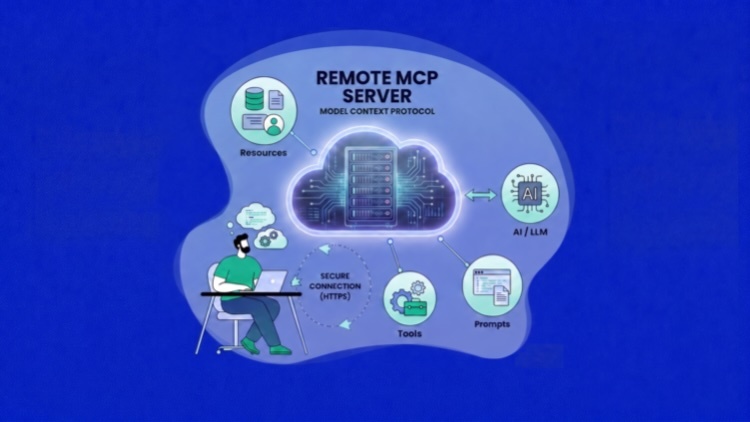
A remote MCP server is a centrally hosted service that puts the Model Context Protocol into practice. Being on external infrastructure, it is separate from the machine running the AI application.
It is accessible via a network endpoint, usually over HTTPS, for any MCP-compatible clients or authorized AI assistants like Claude, Cursor, or Visual Studio Code.

One will find that a remote MCP server has a number of distinguishing traits:
- It is independent of the user’s AI application.
- A network URL or endpoint is required for access.
- Maintenance is in the hands of a development team or service provider.
- There is capacity for multiple authorized clients.
- Any updates to its capabilities are done at the central level.
As for where the server is hosted, that can be with the organization itself, a development team in charge of shared resources, an independent MCP provider, or one of the cloud and software vendors.
The process is straightforward: an MCP client puts in a structured request, and the server, acting as an intermediary with the relevant API, database, or external platform, sends back the result to the AI application.
Since the server is not on the user’s device, there is no need for them to install or maintain the full implementation. The server operator can handle everything from authentication and access controls to updates and availability from a single point.
In short, “remote” describes the server’s location and the means of client access. But the objective is the same: to put the external data and functionality within reach of compatible AI apps.
Launch and Manage Your Website on Cloudways
Deploy websites and PHP applications on a managed cloud hosting platform with built-in support for backups, performance monitoring, security, and scaling. You can also manage supported hosting tasks through the Cloudways Remote MCP Server.
What Is a Local MCP Server?
An MCP server is local when it runs on the same machine or within the same execution environment as the MCP host.
Under ordinary circumstances, an AI client will start up the server as a subprocess. This is the standard for a local configuration. Communication between the two is handled via standard input and output, or what is referred to as the stdio transport.
There are instances when an AI application must access resources on a particular device, making a local MCP server the solution of choice. These might be project files, local databases, scripts and automation, desktop applications, command-line utilities, or even development environments.
For each user’s machine, the local server requires installation and configuration. There are likely dependencies as well, such as particular runtime or package, or certain environment variables.
A local MCP server can still communicate with an external API or cloud service. That said, being “local” is merely a matter of where the process is run and the means by which the client makes a connection.
Remote MCP Server vs Local MCP Server
Ultimately, both remote and local MCP servers are doing the same thing: making available to an MCP client the tools, resources, or prompts it can put to use.
What sets them apart is a matter of where they are hosted, the manner in which a client makes its connection, and who has the responsibility of maintaining them.
| Area | Local MCP Server | Remote MCP Server |
|---|---|---|
| Server location | Runs on the user’s computer or in the same environment as the MCP host. | Runs on external infrastructure managed by a provider or organisation. |
| Typical connection | Commonly uses stdio for communication between the client and local process. | Commonly uses an HTTP-based network connection through a remote endpoint. |
| How it starts | The MCP client usually launches the server as a subprocess. | The server runs independently and is already available when the client connects. |
| Setup requirements | Requires installation, runtime configuration, and dependencies on each device. | Usually requires a server endpoint and authentication details. |
| Maintenance | Each user or administrator must maintain the local installation. | The server operator manages updates and maintenance centrally. |
| Number of users | Typically associated with one local user or client environment. | Can support multiple authorized users and compatible clients. |
| Resource access | Best suited to local files, scripts, tools, and development environments. | Best suited to cloud services, shared platforms, APIs, and hosted data. |
| Authentication | May use operating-system permissions, environment variables, or local credentials. | Commonly uses access tokens, OAuth, headers, or another remote authentication method. |
| Availability | Depends on the user’s device and local server process being active. | Depends on network connectivity and the availability of the hosted service. |
| Updates | Updates must be installed separately on each device. | Updates can be deployed centrally for all users. |
| Typical use case | Giving an AI application access to tools or data on a specific machine. | Providing managed access to an online platform across multiple AI clients. |
For private development or work that is device-specific, one will find a local MCP server to be the preferable option. On the other hand, if there is a need to share capabilities and have them under central control, a remote MCP server is the way to go.
How Does a Remote MCP Server Work?
When an AI application needs to interact with a remote MCP server, the process is straightforward. The server, sitting at a hosted network endpoint, will receive the MCP requests and relay them to the system or platform it represents. From there it goes about verifying access, carrying out the required operation, and sending back what the AI application needs.
Step 1: Configure the Remote Connection
There is no need to install or run the server locally; the client will link to an existing hosted service. To make that happen, the administrator or user puts the MCP server’s URL into the AI application of choice. The setup will require the server endpoint, the proper authentication, and any headers or settings particular to the provider.
Step 2: The Client Authenticates
Access is not given until the remote server has had a chance to check the credentials put forward. In doing so, it will also establish what level of authorization the user has for any given account, workspace, or set of tools and resources. Such a control is required to prevent anyone with the endpoint URL from being able to call on functions that are meant to be protected.
Step 3: The Network Connection Is Established
The client will establish a connection with the MCP endpoint, usually via Streamable HTTP. While this is done with standard HTTP requests, the transport can also rely on Server-Sent Events to deliver progress reports, streamed messages, or server-generated updates.
As part of the first exchange, the client and server will see to it that they are speaking the same MCP language, something that tends to be automatic once the configuration is in place.
Step 4: Interpret the User’s Request
A user might type in a plain-language instruction such as “Show me the servers that are currently running.” The AI application will pick out the right capability on the connected remote server. If the action is one that could alter an external system, the host may ask the user to give the go-ahead first.
Step 5: The Remote Server Processes the Request
What the client transmits is a structured request to the hosted endpoint. From there, the remote MCP server takes over and
- Carries out validation on the request and all its parameters.
- Verifies that the user is authorized to make it.
- Puts the request in the proper format for the system with which it is connected.
- Makes a call to the appropriate backend service, API, database, or cloud platform.
- The backend will then do what is required, be it executing an action or pulling the information at hand.
Step 6: The Result Is Returned
Once the operation is done, the remote MCP server will sort out any provider-specific issues and turn the outcome into an MCP-compatible response for the client. If it is a long-running operation, an identifier or some form of progress update might be sent over instead.
When the final result comes in, the host presents it to the model for the user to see. That information can then serve as context for what comes next; having just listed a few servers, for instance, the user can have the AI inspect one without having to repeat its details again.
How Remote MCP Servers Communicate
There are two distinct layers to MCP communication. The first is the data layer, which relies on JSON-RPC 2.0 to set the structure and meaning of any message passing between the client and the server.
The second is the transport layer, which is how those JSON-RPC messages move between the client and the server. For a remote MCP server, this is usually handled by streamable HTTP.
JSON-RPC Messages
The MCP relies on JSON-RPC 2.0 for the encoding of its communication. Under this protocol, a message will be one of the following:
- A request to have the recipient carry out an operation.
- A response that conveys either an error or a result.
- A notification to put in an update where no reply is expected.
JSON-RPC sets out the contents of these messages and ensures the client and server are in agreement as to how they are to be read.
Streamable HTTP
Streamable HTTP conveys the JSON-RPC messages over a network-accessible endpoint to the remote MCP server.
A client will POST a JSON-RPC message to the endpoint. In turn, the server may give a standard response or, if there is a need to stream several messages at once, whether they are progress reports, notifications, or something initiated by the server, it can make use of Server-Sent Events (SSE).
In this way, streamable HTTP is capable of handling everything from a simple exchange to more involved, ongoing communication.
In other words, JSON-RPC is the definition of the message, and streamable HTTP is its means of delivery.
Security Considerations for Remote MCP Servers
When it comes to remote MCP servers, one has to be mindful of security. Since these servers are network accessible and can expose tools to alter external systems or read sensitive data, a robust set of controls is required to safeguard authentication, permissions, request handling, and data protection.
Authentication and Permissions
The remote MCP server must enforce authentication, whether by way of OAuth, access tokens, or another supported method. Access must be limited in keeping with a user’s role.
The users are to make their connection using credentials that afford no more permission than what their work demands; there should be no inclination to grant wider access than is required.
Secure Token Handling
Proper protection of access tokens is expected of users and client applications in their dealings with a remote MCP server. To that end, credentials should be
- Conveyed via HTTPS exclusively
- Put in secure storage
- Given a narrow scope
- Assigned an expiration date if at all feasible
- Rotated or revoked as the situation demands
On its part, the remote MCP server is to confirm that any credential presented has been issued for the intended service.
Approval for Sensitive Actions
Any action with the potential to impact production systems must have the user’s explicit approval. This is necessary for matters such as:
- Resource deletion
- Halting services
- Code deployment
- Backup restoration
- Modifications to security or access settings
Prior to carrying out the task, it is the client’s responsibility to present the action and all relevant parameters clearly.
Request Validation and Monitoring
The remote MCP server must validate all incoming requests and prevent any attempt by users to make use of unauthorized tools or resources.
To mitigate the risk of request manipulation, session abuse, or the overuse of resources, one can employ rate limits and timeouts alongside activity monitoring, tenant isolation, and audit logs. These measures will also guard against the unauthorized execution of tools.
Data Privacy
Organizations need to have a clear picture of what data is being logged, stored, and processed by the remote server. Any sensitive information must be kept to a minimum and protected, with retention limited to what is necessary.
Prior to linking business-critical systems, it is advisable for users to examine the provider’s policies on compliance, access control, and how they handle data.
Benefits of Using a Remote MCP Server
There are distinct advantages to hosting an MCP server remotely, as it allows the system to offer its capabilities as a centrally operated service. Rather than having to run and maintain the server on their own devices, users simply make a connection to an endpoint that is already in place.
- Local installation is not required — There is no need for users to install the server package, sort out runtime configuration, or deal with local dependencies. In most cases, all that is needed is the remote endpoint and proper authentication.
- Updates are centralized — The server operator can add new tools, resolve issues, and deploy security updates in one place. The user will have access to the latest version without the trouble of reinstalling the server on each device.
- Teams can share access — An organization requiring uniform platform capabilities will find a remote server well suited to the task. It is able to accommodate multiple authorized users and any compatible clients.
- Centralized control over access — Administrators can dictate who has permission to use certain tools or resources. All the usual routine maintenance, from activity logging to permissions and usage policies, is handled at the server level.
- Availability is independent — The server does not rely on a process running locally and will be there even if a user’s machine is down. Access depends on the hosted infrastructure.
- Operations are taken care of — When the MCP server is provided by a third party, they handle the maintenance, the infrastructure, and the connection to the underlying platform. That leaves the user free to focus on what the service can do rather than how to operate it.
Limitations and Challenges of Remote MCP Servers
Unlike a local server, a remote MCP server brings with it a host of operational, privacy, and network dependencies. The following are some of the more significant issues:
-
- Network Dependency — For the client to function, it has to have a clear path to the server endpoint. Any kind of connectivity problem or outage will render the server out of reach.
- Additional Latency — There is an added delay in response times as requests make their way from the client to the remote MCP server and on to the backend system.
- Provider Dependency — The server operator is responsible for support, documentation, compatibility, updates, and general availability.
- Data Privacy and Compliance — Since results and requests are leaving the local environment, an organization needs to be sure its sensitive data is being stored, logged, and processed in a compliant manner.
- More Complex Authentication — Remote access must be secured with proper credential rotation, permissions, expiration policies, and tokens to prevent unauthorized access.
- Client Compatibility — In certain cases, a client will not work with the necessary custom headers, transport, or authentication method unless it is configured accordingly.
- Hosting Responsibilities — A self-hosted remote MCP server requires managing the infrastructure, scaling, backups, and monitoring. For a managed server, the provider handles these tasks.
How Cloudways Uses a Remote MCP Server
The Cloudways MCP Server is a managed remote MCP server that serves as the link between an AI client and the user’s Cloudways account, provided the client is compatible.
Once a user has put in their Cloudways Access Token for authentication, they are free to make natural-language requests for any number of hosting or account management tasks the system supports.
What one can do with these requests is a matter of permissions and which Cloudways features have been enabled. The scope of what is possible includes:
- Manage hosting servers and applications, as well as domains, caches, backups, and scaling.
- Monitor performance and control infrastructure services.
- Handle security, access, DNS, and Cloudflare.
- Work with billing, reporting, deployments, and alerts, along with agency workflows.
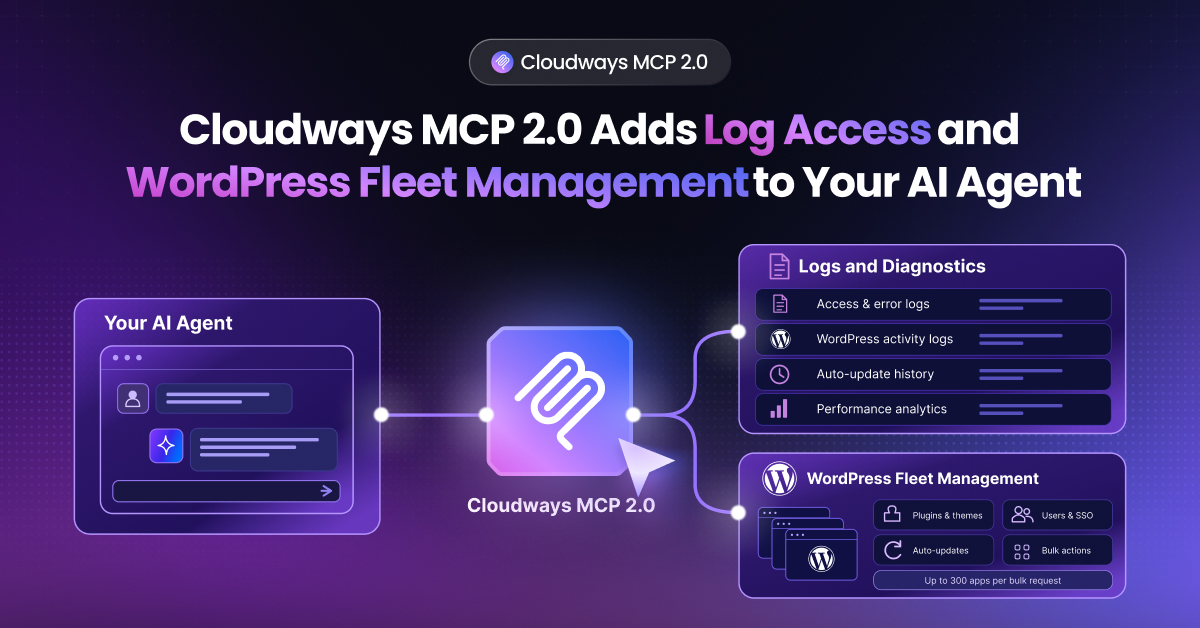
When the AI client puts in a tool request, it is relayed to the Cloudways remote MCP server. There the access is checked, and the server makes the connection to the appropriate function on the Cloudways platform. This shows how a remote MCP server can provide cloud management capabilities through an AI client.
Experience AI-Assisted Hosting With the Cloudways MCP Server
Connect a compatible AI client to the Cloudways Remote MCP Server to launch and manage websites, PHP applications, and hosting servers through natural-language requests.
Final Thoughts
Remote MCP servers offer AI applications a sensible means of engaging with the tools and services that reside beyond the user’s own environment.
A compatible AI client allows for supported actions to be called without the need to go through multiple dashboards or deal with the APIs at a lower level. That is not to say there are no caveats; one must still be diligent in handling matters of data privacy, network access, as well as permissions and credentials.
With MCP seeing wider use, it is only a matter of time before organizations turn to these remote MCP servers as the preferred method for making centrally managed capabilities available to their AI applications and clients.
Q1: What Is a Remote MCP?
Remote MCP refers to a Model Context Protocol server that runs on external infrastructure and is accessed over a network. It allows compatible AI clients to use the server’s tools and data without running the MCP server on the user’s local device.
Q2: Can an MCP Server Run on a Remote Host?
Yes. An MCP server can run on a cloud platform, private server, or other remote infrastructure. Clients typically connect to it through a network-accessible endpoint using Streamable HTTP.
Q3: Are MCP Servers Local or Remote?
MCP servers can be either local or remote. Local servers commonly run on the user’s computer and communicate with the MCP client through stdio. Remote servers run independently and are typically accessed over a network using Streamable HTTP.
Q4: How Do You Connect to a Remote MCP Server?
Obtain the server URL and authentication details from the provider or server administrator. Add them to a compatible MCP client, complete the required authentication, and test the connection with a simple request.
Q5: How Do You Get a Remote MCP Server URL?
For a managed server, the provider supplies the MCP endpoint URL. For a self-hosted server, the URL is created when the server is deployed and its MCP endpoint is made accessible to authorized clients.
Start Growing with Cloudways Today.
Our Clients Love us because we never compromise on these
[email protected]
Nisha is a technical content writer with a passion for translating complex technology into content that’s clear, practical, and enjoyable to read. With strong technical insight and a user-first mindset, she crafts guides that help readers understand and use modern tools and platforms.