Key Takeaways
- With the right prompt, an AI website builder can build a full portfolio, complete with all the necessary pages, copy, imagery, layouts, and project sections.
- To make a portfolio look professional and simple to navigate, ensure there is consistent branding, a responsive design, and straightforward contact options.
- While AI can build a portfolio quickly, the best portfolios depend on how well they present their work, the careful curation of projects, and the inclusion of genuine project details.
The idea has been with you for some time: To have a portfolio that reflects the work you are proud of. As it stands, there is only the “coming soon” page from years back or the PDF you send off to clients because building a portfolio website seems like too much of a project on its own.
For most, it is the minor details that delay getting the portfolio online. There is the matter of deciding on a platform, dealing with hosting, then structuring the site, writing case studies, and sorting through project galleries.
For a developer, photographer, illustrator, or designer, the distance between the thought of updating the portfolio and having a live site is one that can span years.
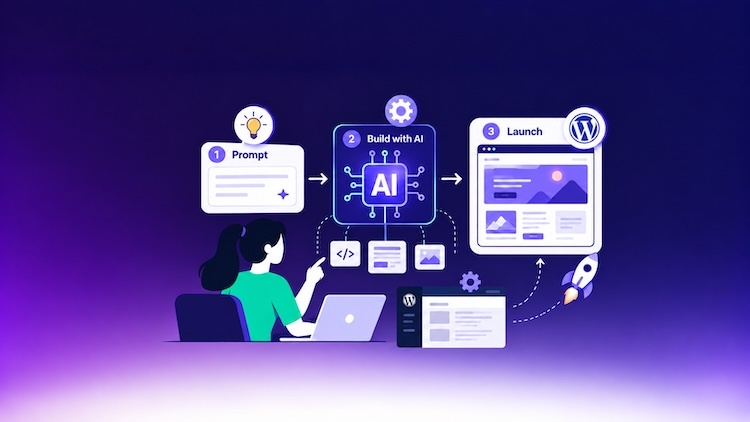
An AI portfolio website builder is meant to bridge that gap. You need to only describe the kind of portfolio in mind, and it will produce a site of professional caliber, complete with an about and contact page, case studies, and project galleries.
In this walkthrough, we will take you through the process of building a portfolio from the ground up and demonstrate how it works across different creative fields.
- What Should a Creative Portfolio Website Include?
- What Can Cloudways AI Website Builder Generate for a Portfolio Website?
- How to Build a Portfolio Website with Cloudways AI Website Builder
- Step 1: Set a Goal for Your Portfolio and Assemble the Content
- Step 2: Craft a Detailed Prompt for Your Portfolio Website
- Step 3: Generate Your Portfolio and Review Your Website Structure
- Step 4: Make Your Homepage Reflect Your Personal Brand
- Step 5: Build a Strong Project Showcase
- Step 6: Turn Selected Projects Into Detailed Case Studies
- Step 7: Refine Your About, Services, and Contact Pages
- Step 8: Review and Publish Your Portfolio on Cloudways
- Best Practices for an AI-Built Creative Portfolio
- Final Thoughts
- Frequently Asked Questions
What Should a Creative Portfolio Website Include?
There are four questions a well-constructed creative portfolio should address: who you are, what you do, how your finest work is presented, and how one might go about working with you.
While the specifics will differ from one profession to another, there are some essential pages that any portfolio should have:
- A homepage to make an introduction and to put your best work on display right away.
- An About page where you can set out your experience, background, approach, and any specialties.
- Projects or Portfolio page to let visitors browse through your work.
- Case study or individual project pages to provide some context for a given piece rather than simply presenting the final product.
- Services or Expertise page if the aim is to draw in clients or freelance opportunities.
- Contact page so there is no ambiguity as to the next step for a recruiter, collaborator, or client.
How much weight is given to each element is a matter of discipline. A photographer is going to lean on galleries; a developer will want to include live links, project descriptions, and technology stacks.
Designers might opt for in-depth case studies to lay out their process, whereas an illustrator might arrange pieces into visual collections. Then there are the optional add-ons like a blog, resume, list of clients, or testimonials; these are worth including, provided they serve your professional objectives.
What Can Cloudways AI Website Builder Generate for a Portfolio Website?
For users looking for an AI portfolio website builder, Cloudways AI Website Builder can generate a fully fledged, multi-page WordPress site from a natural-language prompt. The result is an actual website in need of some fine-tuning, not a blank WordPress install or an empty template to start from.
What is produced has a solid SEO foundation as well as responsive layouts, page structure, imagery, and copy.
When it comes to building a creative portfolio, the Cloudways AI Website Builder offers a number of options:
- Project showcases: Work and portfolio pages with dedicated sections and layouts to put your best projects on display.
- Case studies: Dedicated pages for individual projects, laid out with an overview of the role, the challenge, the process, and the solution, along with the visuals and results.
- Personal branding: Consistent use of typography, fonts, spacing, color, and other visual elements throughout the site.
- Image galleries: For any image-led work, be it photography, UI, illustration, or branding.
- Contact and lead capture: To facilitate inquiries, bookings, or freelance opportunities, the site can be equipped with contact forms, banners, and other conversion elements.
- SEO-ready website: The generated site has a solid SEO foundation and follows Yoast best practices.
- Responsive layouts: The pages will adjust to fit any device, whether viewed on a mobile, tablet, or desktop.
- Blog or Insights: Support for WordPress-native long-form content in a blog or insights section, suitable for tutorials, design thinking pieces, development articles, or behind-the-scenes material.
Once the site has been generated, there are three options for further customization with Cloudways: you can use the Visual Editor for direct alterations, the Code Editor for more advanced work, or the AI Chat for making changes via prompt.
How to Build a Portfolio Website with Cloudways AI Website Builder
The process of building a portfolio is much the same whether one is a developer, an illustrator, a photographer, or a designer. What sets one apart from another is the way in which the site organizes and puts your work on display.
To demonstrate this, we will walk through building a product designer’s portfolio, from the first prompt to a live WordPress website using Cloudways AI Website Builder.
Step 1: Set a Goal for Your Portfolio and Assemble the Content
Prior to having the website generated, you need to determine what the portfolio is meant to do and have the necessary project information at hand.
A freelance photographer is likely looking to field inquiries for shoots; an illustrator may wish for art directors to see some commercial pieces. A developer might be aiming at recruiters, or the designer in search of a new role or freelance opportunities.
Whatever the aim, it should dictate the structure of the portfolio and the kind of action you want from your visitors. Gather the visual assets and particulars of your work to back it up.
While AI can be of assistance in building the portfolio, the substance of your experience and the work that gives you credibility has to come from you.
The material will be specific to the trade:
- Designer: You will need the final designs and results, as well as the brief, your role and responsibilities, and the process behind them.
- Photographer: You need to have chosen images, client and project details, descriptions of the shoot, and categories.
- Illustrator: Provide finished illustrations, both personal and commissioned, along with any project briefs and publication or client info to show the purpose of each piece.
- Developer: Summaries of the project, any live links or repositories, and technology stacks, as well as technical responsibilities.
Take Lina, the product designer, for instance. Her portfolio needs to put her experience with digital products before potential clients and design leads to let them look over some of her projects and make it easy to get in touch regarding freelance work. To that end, we will be compiling her most compelling case studies, the visuals and outcomes from those projects, her areas of expertise, and the history that defines her expertise.
Step 2: Craft a Detailed Prompt for Your Portfolio Website
For new users, the process starts on the landing page of the Cloudways AI Website Builder to put in the structured prompt.
Provide a prompt that gives the AI all the context it needs to produce a solid first draft of your portfolio. Describe your profession and the goal of the portfolio, who the target audience is, the pages you require, how projects should be presented, the visual style, and any must-have features.
After prompt submission, you will be asked to set up and verify a Cloudways account; from there, a flexible server is put in place for the account, and the portfolio website is built on it.
The moment the editor comes up with the finished site, the 3-day free trial is underway. This covers one AI website creation and 8 AI Credits. Once the trial is over, the site will be left as is, but access to the editor and its AI capabilities will be lost unless you subscribe to an AI Website Builder plan.
If you are already with Cloudways, you can find the AI Website Builder via the banner on the platform.

After a prompt is entered, you have the option to use a current paid server or create a new one. Cloudways will handle provisioning the application and any necessary plugins on the server of your choice.
Take Lina’s product design portfolio as an example. One might write something like this in the prompt field:
“Build a modern portfolio site for Lina Vale, a product designer with a focus on digital products. I want to attract startup founders, creative teams, and design leads who may be in need of freelance support. The look should be uncluttered and contemporary with plenty of whitespace, charcoal type on an off-white background, and a single bold blue for buttons and links. The site will comprise these pages: Home, Work, About, Services, Insights, and Contact. On the homepage, I would like a brief intro, some chosen work, and areas of expertise, along with a contact CTA. For the Work page, set up individual case studies for product and visual design that walk through the project overview, role, challenge, process, solution, final visuals, and results. Use large imagery and good typography. Put in a contact form as well. Use placeholders for anything not provided; do not make up clients, credentials, or results.”
You can take this approach for any creative field. An illustrator can arrange things by type of illustration, a developer may want project pages that include live links and technology specs, or a photographer would want image-heavy galleries and collections.
Build Your Portfolio With AI
Turn your project ideas into a polished WordPress portfolio with Cloudways AI Website Builder, then customize the design, content, and layout to make it your own.
Step 3: Generate Your Portfolio and Review Your Website Structure
The Cloudways AI Website Builder will set to work on generating the portfolio after you submit the prompt. The build screen will indicate that this can be a two or three-minute process. You can watch the generation process unfold in real time via a running checklist, which details the assembly of the site’s styles, pages, and structure.
The editor will display a preview of the finished website once the AI has done its job, complete with a summary of the sections and pages it has created. From here, you can review the pages to assess the design, content, and imagery, as well as the general structure, prior to any alterations.
What you are looking for is a sound foundation. Make sure the navigation is logical, the visual direction is right for your work, and the projects are given due prominence.
In the case of Lina’s product design portfolio, one would want to check the homepage, the Work and About pages, the contact path, and how the case studies are laid out.
Others will have different priorities; a developer might be more concerned with how technical skills are presented, whereas an illustrator or photographer might focus more on how the gallery is presented.
Step 4: Make Your Homepage Reflect Your Personal Brand
The first thing a visitor to your homepage should be able to tell is who you are as a professional and the nature of your work. So before you get to the design details, it is best to decide on the brand direction you want the portfolio to convey. Think about the visual style, tone, imagery, colors, and typography you like, as well as any logo or other brand assets in use.
Begin with the hero section. The headline has to be unambiguous about what you do; from there, let the rest of the page lead people to your best work and a logical next step for the visitor.
For Lina’s portfolio, we have opted for a modern, uncluttered look with ample whitespace and large project visuals. A single accent color will draw the eye to buttons and links while the typography remains simple. The introduction is kept brief, key projects are given prime placement on the homepage, and there is a CTA for any prospective clients.
Cloudways AI Website Builder offers a number of ways to apply your personal branding across the portfolio:
- AI Chat: Tell the system in plain terms what you want to see, be it a new color palette or a change in overall style.
- Edit: Go into the Visual Editor to make direct adjustments to an element’s size, layout, alignment, font, or spacing.
- Code: For those who need control at the code level for finer styling, the Code Editor is available.
- Theme: To ensure consistency across all pages, update the site-wide fonts and theme colors.
Depending on the profession, the approach will be different. An illustrator might go for something more expressive, a developer for a clean, functional presentation, and a photographer would likely want a minimal interface to let the photos speak for themselves.
Every prompt that makes a change will cost 1 AI Credit. To use them efficiently, it is better to submit a single prompt for multiple updates; say, you can combine changes to the CTA, spacing, typography, or color together, rather than making separate submissions.
Step 5: Build a Strong Project Showcase
In any creative portfolio, the project showcase is typically what matters most. Do not feel compelled to put on display every piece of work; instead, be selective and highlight the projects that are most indicative of your experience and skills and the kind of role you are after.
Lina’s portfolio presents three or four solid product design projects. They can be presented with a title, a brief description of the role, and a strong visual, then link the better ones to in-depth case studies.
Should the Work page require fine-tuning, the AI Chat can be of service in reorganizing the layout or content.
A case in point would be an instruction such as “Put more of a visual emphasis on the Work page. I want the first project to be prominent and larger, with the rest of them set out in two columns. Let the descriptions be brief and include an image gallery under the featured work.”
The Cloudways AI Website Builder is well-suited to these kinds of adjustments. Alternatively, the Visual Editor is available for making direct adjustments to spacing, imagery, and individual elements.
The presentation should match the type of creative work that is being showcased. A photographer will want a gallery layout with large images; an illustrator may prefer to sort work into commercial or editorial collections. A developer may prefer project cards with a summary of the tech stack and a link to a live repository.
But irrespective of what the layout is, the priority is to let the most pertinent and impressive work stand out.
Step 6: Turn Selected Projects Into Detailed Case Studies
While a gallery is for displaying the completed work, some projects will require additional context to put your contributions and how you went about them.
For instance, Lina might structure a case study in this way:
Project Overview > Role > Challenge > Process > Solution > Final Designs > Results
You can use the AI Chat feature in Cloudways AI Website Builder to reorganize or build a case study page. One might enter a prompt along these lines:
“Turn this project titled <project name> into a detailed case study with an overview of the project and my role, then the challenge, design process, and the key solutions before moving on to the final designs and results. The tone should be professional and the copy concise.”
Let the AI handle the organization and refinement, but the finished piece has to be true to the responsibilities and project details you have on record. This approach is not limited to one type of creative profession.
A developer would put the emphasis on the technical side of things, the technologies deployed, and the implementation; a photographer can provide background on the brief, where a shoot took place, or the production involved; an illustrator could set out the brief, intended use, and creative approach behind a commission.
For the longer pieces, break up the text with sketches, prototypes, or other visuals from the project to keep things engaging.
Include real testimonials, client references, credentials, and any awards to let the portfolio be a true reflection of your professional experience.
Turn Your Portfolio Idea Into a Published Website
Create a portfolio with AI, refine it with visual or code-level control, and publish it on Cloudways managed hosting when you’re ready to go live.
Step 7: Refine Your About, Services, and Contact Pages
While the project work in your portfolio shows what you are capable of, it is the About, Services, and Contact pages that will tell a visitor about your background, what services you offer, and how to reach you.
Keep the About page uncluttered and focused on the essentials: your experience, background, specialties, and the way you work. Should you be a freelancer, make sure there is a dedicated Services or Expertise area to put your offerings in plain view.
A photographer will want to set out portrait or commercial work; an illustrator might put editorial and brand illustration; a developer can list technical consulting or frontend skills.
When it comes to the Contact page, you should make it straightforward for any prospective client to get in touch. With Cloudways AI Website Builder, you can add a contact form and set up some clear CTAs on the appropriate pages via the AI Chat.
To view the inquiries or form submissions, go to the WordPress menu at the top right of the AI Website Builder and choose Form Submissions.
From there, the WordPress Form Overview will give you a handle on the activity and let you manage the forms on the website.
Step 8: Review and Publish Your Portfolio on Cloudways
It’s worth doing one final review before you make the portfolio public. While the Cloudways AI Website Builder will have created a responsive layout, you should verify that navigation, forms, buttons, project images, and contact information all render properly on desktop, tablet, and mobile.
Take a moment to also review the page copy, headings, alt text on the images, and any project titles. Once you are satisfied with the appearance, select Publish from the top right of the AI Website Builder. The site will be deployed to Cloudways managed hosting without any manual migration or the need to sort out a separate hosting setup.
After that, navigate to Applications and open the WordPress app you have built with the AI. Under Application Management, you can use Domain Management to link to your custom domain.
You can also enable HTTPS by installing a free Let’s Encrypt SSL certificate via the SSL Certificate option.
The portfolio is now live for any prospective clients, employers, or collaborators to see. Lina, for instance, has a product design portfolio she can put in front of design teams and potential clients. It is the same procedure for an illustration or photography portfolio or even a developer showcase.
Since the site is based on standard WordPress and Gutenberg blocks, further editing is possible, or you can let a WordPress developer handle more in-depth customization.
Exporting and migrating the site to a different host is an option should the need arise, though leaving Cloudways would mean giving up the AI Website Builder’s design and editing tools for that particular site.
Best Practices for an AI-Built Creative Portfolio
While AI will speed up the process of building a portfolio, the quality of the finished site is determined by how you present it and what you decide to put on display. With that in mind, there are some principles worth observing:
- Lead with your strongest and most relevant work. Showcase the projects that define your skills and the kind of work you wish to be associated with; do not feel compelled to display every project you have been involved in.
- Make your contribution clear. If a project was a team effort, make sure to outline your specific role and what you were responsible for.
- Use real project information. Whether it is client names, credentials, testimonials, or project outcomes, ensure all the information is verifiable and correct.
- Give visuals enough space. With your choice of typography and layout, keep the focus on your photographs, interfaces, and illustrations.
- Keep your brand consistent. From the color palette to the tone of your writing and image treatments, these elements should be uniform throughout the site.
- Edit AI-generated copy. Edit the text so that it is a true reflection of your experience and properly conveys your professional tone.
- Keep contact options easy to find. A potential employer or collaborator should have no trouble finding a clear way to contact you.
- Review on different devices. Verify that navigation, galleries, and case studies are as functional on a mobile or tablet as they are on a desktop.
- Keep your portfolio current. As your career moves forward, update your availability and services, and put in new projects in place of anything that is no longer representative of your work. The Cloudways AI Website Builder will allow you to do this via the Visual or Code Editor, or even through AI Chat.
AI will give you the tools and the framework to build the portfolio site, but it is your creative judgment and point of view that make the portfolio your own.
Final Thoughts
Whether you are a designer, photographer, illustrator, or developer, the way in which you put your work on display will vary. Yet every professional requires a portfolio that makes a quick impression on their strengths and compels the visitor to look deeper.
An AI portfolio website builder is a great way to help you speed up the process of making those portfolio pieces into a site with a professional finish.
Cloudways AI Website Builder, for instance, allows you to create a WordPress site from a simple prompt. From there, you can fine-tune the content, visuals, and how the projects are laid out to suit your creative identity.
In the end, while AI may assemble the portfolio, the story and perspective it conveys must be undeniably your own.
Q1: What makes a great portfolio website?
A strong portfolio will tell visitors who you are and what you do while putting your best work on display. It should make it easy for any potential employer or client to get in touch with you, and it needs to function well on any device. It should have a personal brand that is consistent, a relevant context around your best projects, and a clear presentation of them.
Q2: Can I create a portfolio using AI?
Certainly. You can use an AI portfolio website builder to produce a site from a simple prompt that outlines your style, audience, profession, and the features you want. After the initial generation, you can make any adjustments to the design, replace the placeholders with your actual work, and then publish.
Q3: Which website builder is best for building a portfolio?
That is a matter of how much ownership and customization you require. Cloudways AI Website Builder is a solid choice for creatives looking to build a WordPress portfolio website; a simple prompt will produce a full multi-page site with responsive layouts, content, and portfolio pages, as well as an SEO structure. Once built, you can use the Visual or Code Editor, or even AI Chat, to make customizations before publishing on Cloudways managed hosting.
Q4: How much does it cost to build a portfolio website?
You will find the expense varies with your approach. Using an AI portfolio website builder will keep the initial design and development costs down, whereas bringing on a professional designer or developer is a much larger expense, particularly for a complex site. Cloudways AI Website Builder has a 3-day free trial to get started, which comes with 8 AI Credits and a single site creation. The Pro plan starts from $7.99 a month per website and provides 20 AI Credits. Also factor in the recurring fees for a domain, hosting, and any premium plugins or tools.
Q5: Which hosting is best for a portfolio website?
Look for a host with security, SSL, reliable performance, and the flexibility to accommodate growth. In the case of a WordPress portfolio, Cloudways managed hosting is a solid option; its cloud infrastructure is fully managed and comes with support for scaling, along with automated backups.
Q6: Which domain is best for a portfolio website?
A straightforward domain tied to your name or brand is generally preferable, say yourname.com. A short, memorable address that is easy to spell is ideal, and try to steer clear of hyphens or numbers unless they are absolutely necessary.
Start Growing with Cloudways Today.
Our Clients Love us because we never compromise on these
[email protected]
Nisha is a technical content writer with a passion for translating complex technology into content that’s clear, practical, and enjoyable to read. With strong technical insight and a user-first mindset, she crafts guides that help readers understand and use modern tools and platforms.