Most hosting problems don’t arrive without warning. There are subtle signals, such as CPU creeping upward, resources tightening, and processes quietly misbehaving. If left unchecked your site may go offline. The problem is that by the time most monitoring tools sound the alarm, the damage is already done.
That’s the gap Cloudways™ Copilot is now built to close.
With Proactive Suggestions, Cloudways Copilot moves beyond investigating and fixing a critical issue after it has happened, to proactively flagging, investigating, and fixing a potential issue that can cause server/website downtime.
Proactive Suggestions is available to all active Cloudways Copilot users.
From Reactive to Proactive: Why This Matters
Until now, Cloudways Copilot’s AI-powered insights and SmartFixes have engaged at the moment of crisis, usually when an app goes down or a server crashes. That capability is genuinely valuable when the worst happens, but it still means downtime has already occurred.
Every minute of unplanned downtime has a cost, and for high-traffic websites those costs compound quickly. What managed hosting customers require is an earlier warning system that surfaces risk while there’s still time to act, not after the fact.
With Proactive Suggestions, Cloudways Copilot now continuously monitors your server resources and raises a flag (suggestion to act on) when the resource usage crosses into the danger zone and can potentially crash the server, causing website downtime. Think of it as a block of intelligent early warnings sitting between normal operation and critical failure. As a result, Proactive Suggestions is designed to act as a layer of protection that gives you the window to intervene before your users notice a problem.
How It Works
Under the hood, Cloudways Copilot monitors actual server resource usage and evaluates whether the numbers have crossed pre-set thresholds.
For the High CPU Utilization use case (the first Proactive Suggestions) Cloudways Copilot periodically collects CPU consumption readings and applies industry-standard models to discover and flag when consistent high CPU usage can potentially crash the server, causing all hosted websites to become unavailable to the visitors. This process is robust enough to filter out brief, normal spikes (cron jobs, routine traffic bursts) and only alerts you when there is a sustained pattern of elevated load that may precede crashes and outages.
When a suggestion is raised, here’s what happens:
- A suggestion card appears in your Cloudways dashboard.
The suggestion lives in the Cloudways Copilot panel inside the platform, where you’ll see it the next time you log in. This lack of multi-channel noise keeps communication focused and avoids alert fatigue.

- You review the situation.
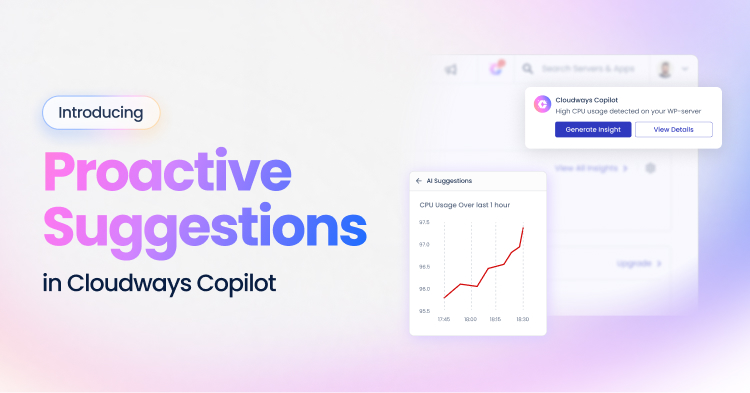
Clicking the suggestion opens a CPU usage graph for your server, giving you immediate visual context showing how your resource usage has been trending.
- You choose whether to dig deeper.
If you want Cloudways Copilot to investigate the reason behind high CPU usage, clicking Generate Insight triggers Cloudways Copilot to perform a detailed investigation. It returns a structured investigation insight highlighting the primary reason behind the high CPU usage, and the steps recommended to resolve it.
- One-click remediation (if applicable).
In many cases, Cloudways Copilot has a pre-built recipe that it can deploy to fix the underlying cause. In these cases, a SmartFix option appears alongside the insight, letting you apply the resolution in a single click.
How Credits Works
Proactive Suggestions are generated on the platform at no credit cost. Credits are consumed only when you actively request an AI insight or apply a SmartFix. This is consistent with how credits work for reactive incident insights today. As such we have made no changes to Cloudways Copilot plan credit allocations as part of this launch.
| Action | Credit Cost | Details |
|---|---|---|
| Proactive Suggestion Raised | Free | Cloudways Copilot detects and surfaces the suggestion automatically. |
| Generate Insight | 1 credit | Triggers AI root-cause analysis and recommended steps. |
| SmartFix (Successful) | 1 credit | Charged only when Cloudways Copilot successfully resolves the issue. |
| SmartFix (Unsuccessful) | Credit reverted to the user | No charge if the fix does not resolve the problem. |
What Makes Proactive Suggestions Different from Standard Monitoring
Traditional monitoring tools can tell you that your CPU is at 90%. What they can’t tell you is why. And, without the why, you’re left guessing about the cause, and either waste hours troubleshooting yourself or open a support ticket. A runaway PHP process, a traffic spike your server isn’t scaled to handle, or a poorly timed cron job are just three causes with very different resolution paths. Critically, during an incident, you rarely have the time to diagnose and apply the right one.
Proactive Suggestions change that in two important ways.
First, it is designed to identify the problem early, giving you time to think rather than forcing you to react under pressure.
Second, when you do choose to investigate, Cloudways Copilot explains the root cause and recommends a potential fix (if available). That’s not something a threshold alert can do.
| Capability | Traditional Monitoring | Cloudways Copilot |
|---|---|---|
| Proactive Suggestions | ✓ | ✓ |
| Warns you before something goes wrong | ✓ | ✓ |
| Filters out noise so you only get meaningful alerts | ✕ | ✓ |
| Tells you why the problem is happening | ✕ | ✓ |
| Shows you exactly how to fix it | ✕ | ✓ |
| Applies the fix after you give it your consent | ✕ | ✓ |
What’s Available Now (and What’s Coming!)
High CPU Utilization is the first Proactive Suggestion use case, and it’s available now to all Cloudways customers on all plans. If you have Cloudways Copilot enabled, monitoring is already running.
This is the beginning of broader proactive coverage. The near-term roadmap includes:
- High Memory Consumption
- High Disk Utilization
- High Bandwidth Utilization
- Slow Query Detection
Each new use case adds another layer to your early warning system. The ultimate vision is to build toward full-spectrum proactive monitoring that watches every major dimension of server and application health*.
*: This information reflects our current plans and product direction and is subject to change without notice. It is provided for informational purposes only and is not a commitment to deliver any material, feature, or functionality.
Stay Ahead, Not Just Informed
Running a production website or application means accepting that things will go wrong. The real question you should be asking is whether you’ll know about it in time to prevent the incident snowballing into a critical issue.
Proactive Suggestions is built to answer that question. By continuously watching your server health, surfacing risk early, and pairing every alert with a clear root cause and a one-click fix, it is designed to help provide you the one thing traditional monitoring usually couldn’t: a real window to act before your users feel the impact.
Instead of only discovering a problem after it has already occurred, you now have a system designed to flag risk early and assist with diagnosis and remediation before an outage occurs. That’s not just better monitoring. It’s a fundamentally different relationship with your infrastructure.
DISCLAIMER: Results in customer environments may vary depending on configuration, implementation, and usage. Results and/or server stability improvements are not guaranteed. Any references to third-party technologies or acronyms are for informational purposes only and do not imply any affiliation with, sponsorship by, or endorsement of those third parties.
[email protected]
Zafar Iqbal is a Senior Technical Writer who's spent the last decade making server products, WordPress, and SaaS platforms actually make sense to people. As someone who lives at the intersection of tech and marketing, he loves turning complicated technical concepts into insights that help people make the right business decisions. When he's not demystifying managed hosting infrastructure, he's tinkering with his hobby projects.