Key Takeaways
- Default WooCommerce lacks essential B2B features like tiered pricing and tax exemptions, making third-party plugins necessary for scaling.
- A “Wholesale Order Form” is critical for B2B efficiency, allowing buyers to add dozens of SKUs to their cart from a single page.
- Top plugins include Wholesale Suite (best order form), Barn2 (developer-friendly), and B2BKing (enterprise features).
- Wholesale operations are database-intensive; high-performance hosting with Object Caching is vital to prevent slow checkout experiences.
B2B ecommerce is projected to reach $20.9 trillion by 2027, dwarfing B2C sales. Yet most WooCommerce store owners are leaving this revenue on the table because their stores aren’t equipped for wholesale buyers.
Here’s the problem: default WooCommerce wasn’t built for B2B. There’s no native way to hide prices from retail customers, offer tiered discounts based on order volume, or let wholesale buyers add 50 products to their cart from a single page. Wholesale customers expect tax exemptions, custom payment terms, and minimum order quantities, none of which come standard.
The good news? You don’t need a separate website or a complex custom build. The right plugin can transform your existing WooCommerce store into a hybrid B2B/B2C platform, serving retail shoppers and wholesale buyers from the same inventory.
We’ve tested the leading solutions—from the official WooCommerce extension to aggressive newcomers, so you can make an informed decision. Let’s find the right wholesale plugin for your business.
-
- What to Look for in a WooCommerce Wholesale Plugin
- Quick Comparison: Top WooCommerce Wholesale Plugins
- The 7 Best WooCommerce Wholesale Plugins Reviewed
- Must-Have Feature: The WooCommerce Wholesale Order Form
- Hosting Your Wholesale Store: Why Performance Matters
- Conclusion: Choosing the Right Wholesale Plugin
- Frequently Asked Questions
What to Look for in a WooCommerce Wholesale Plugin

Before diving into specific plugins, you need to understand what separates a basic wholesale solution from one that actually scales. Here are the non-negotiable features for serious B2B operations:
Dynamic and Tiered Pricing
Your wholesale pricing strategy needs flexibility. Look for plugins that support:
- Role-based pricing: Different prices for “Wholesale Customer,” “Distributor,” or “VIP Buyer” roles
- Quantity-based discounts: Buy 10 units, get 5% off; buy 100 units, get 15% off
- Category-level rules: Apply blanket discounts to entire product categories
- Global percentage discounts: Quick setup for stores with simple pricing structures
Custom User Roles and Registration
B2B isn’t one-size-fits-all. Your plugin should let you create multiple wholesale tiers (e.g., Bronze, Silver, Gold distributors) with distinct pricing and permissions. Equally important is a registration workflow that captures business information upfront—company name, tax ID, reseller certificate—and optionally requires manual approval before granting wholesale access.
Wholesale Order Forms
This is the feature that separates hobbyist solutions from professional wholesale plugins. A wholesale order form displays your entire catalog in a spreadsheet-style table, allowing bulk buyers to enter quantities for multiple products and add everything to their cart with a single click. Without this, your wholesale customers are forced to navigate product pages one by one—a frustrating experience that drives them to competitors.
Tax Exemptions and Shipping Control
Wholesale buyers typically expect tax-exempt pricing (since they handle sales tax on resale). Your plugin should support tax exemptions by user role and ideally integrate with tax validation services. You’ll also want control over which shipping methods are available to wholesale customers—they may qualify for free freight or prefer their own logistics provider.
Product Visibility and Private Stores
Some products should only be visible to logged-in wholesale customers. Whether you’re running a completely private B2B store or just hiding certain SKUs from retail browsers, visibility controls are essential. The best plugins let you hide prices, hide products, or display “Login to See Pricing” messages to encourage registration.
Quick Comparison: Top WooCommerce Wholesale Plugins
Before we dive into detailed reviews, here’s a snapshot of the leading solutions:
| Plugin | Best For | Starting Price | Free Version? | Order Form? |
|---|---|---|---|---|
| Wholesale for WooCommerce | Seamless WooCommerce integration | $129/year | No | Add-on |
| Wholesale Suite | Dedicated bulk order forms | $99/year | Yes | Yes |
| Barn2 Wholesale Pro | Agencies & developers | $199/year | No | Bundle |
| WholesaleX | All-in-one dynamic pricing | $129/year | Yes | Yes |
| B2BKing | Enterprise B2B features | $249.5/year | No | Yes |
| Wholesale Prices for WooCommerce | Small stores testing wholesale | Free | Yes | No |
| Plugin Republic Wholesale Bundle | Min/max quantity controls | $99/year | No | Add-on |
The 7 Best WooCommerce Wholesale Plugins Reviewed
We’ve evaluated each plugin based on feature depth, ease of use, performance impact, and value for money. Here’s our breakdown:
1. Wholesale for WooCommerce
Best for: Store owners who prioritize compatibility and long-term support
The Wholesale for WooCommerce extension comes directly from WooCommerce’s marketplace (developed by WPExperts). This means guaranteed compatibility with WooCommerce core updates, Automattic’s quality standards, and documentation that integrates with the broader WooCommerce ecosystem.
Key Features:
- Multiple user roles (Wholesaler, Distributor, Retailer) with distinct pricing
- Global, category, and product-level pricing controls
- Tiered pricing based on quantity purchased
- Product visibility restrictions by role
- Custom registration forms with approval workflow
- Dedicated wholesale dashboard with sales reports
Pros:
- Native WooCommerce integration ensures stability
- Professional support through WooCommerce channels
- Clean admin interface that feels like core WooCommerce
Cons:
- Order form functionality requires additional extensions
- Higher total cost if you need the complete B2B feature set
Pricing: $129/year for a single site
2. Wholesale Suite (The Market Leader)
Best for: Stores that need a dedicated wholesale order form for bulk purchasing
Wholesale Suite is the most widely-adopted wholesale solution for WooCommerce, with over 25,000 active installations. The suite consists of three plugins that work together: Wholesale Prices (free/premium), Wholesale Order Form, and Wholesale Lead Capture.
What sets Wholesale Suite apart is their Wholesale Order Form—a purpose-built product table that lets B2B customers search by SKU, filter by category, and add dozens of products to their cart without navigating away from the page. For high-volume buyers ordering hundreds of SKUs, this is a game-changer.
Key Features:
- Free core plugin with essential wholesale pricing
- Industry-leading wholesale order form add-on
- Lead capture with customizable registration forms
- Multi-currency support via Aelia and WPML integrations
- Wholesale shipping and payment gateway restrictions
- Minimum order quantity and subtotal requirements
Pros:
- The order form is genuinely best-in-class
- Free version lets you test before committing
- Excellent documentation and responsive support
Cons:
- Full functionality requires purchasing multiple plugins
- Bundle pricing can add up for small operations
Pricing: Free core plugin; Wholesale Prices Premium starts at $99/year; Full bundle (all four plugins) from $299/year.
3. Barn2 WooCommerce Wholesale Pro
Best for: Developers and agencies building professional B2B solutions
Barn2’s Wholesale Pro has earned a reputation for clean, lightweight code and excellent performance. It ranks consistently in the top organic positions for wholesale-related searches, which speaks to the plugin’s quality and the company’s authority in the WooCommerce space.
The standout feature is Barn2’s private store functionality. You can completely hide your shop from logged-out users, restrict entire categories to specific wholesale roles, and display custom messages encouraging visitors to register. This makes it ideal for stores that operate exclusively in B2B or need strict access controls.
Key Features:
- Unlimited wholesale user roles with flexible pricing
- Global, category, or product-specific discounts
- Self-service wholesale registration with approval
- Private store mode (hide everything from non-wholesale users)
- Payment and shipping method restrictions
- Bundles with WooCommerce Product Table for order forms
Pros:
- Exceptionally clean, well-documented code
- Lightweight with minimal performance impact
- Outstanding support from a developer-focused company
Cons:
- No free version available
- Order form requires separate Product Table plugin purchase
Pricing: $199/year for Wholesale Pro; $249/year for the complete bundle with Product Table
4. Wholesale Prices for WooCommerce (The Free Option)
Best for: Small stores testing the wholesale waters with minimal investment
If you’re not ready to commit to a paid solution, the free Wholesale Prices plugin from Wholesale Suite is the most capable no-cost option. Available directly from WordPress.org with 500+ five-star reviews, it provides the fundamentals you need to start accepting wholesale orders.
What You Get for Free:
- A new “Wholesale Customer” user role
- Ability to set wholesale prices on any product
- Minimum order subtotal requirements
- Option to show/hide retail prices for wholesale users
- Compatible with Aelia multi-currency plugin
Limitations:
- Only one wholesale role (no tiered pricing by customer level)
- No product visibility controls
- No registration form or approval workflow
- No order form functionality
Verdict: A solid starting point, but most growing stores will outgrow it quickly and upgrade to the premium version.
5. WholesaleX
Best for: Stores wanting an all-in-one solution with advanced dynamic pricing
WholesaleX positions itself as the “most advanced” wholesale plugin, and the feature list supports that claim. Beyond standard wholesale pricing, it includes dynamic rules engines, built-in conversation systems for quote negotiations, and wallet functionality for B2B credit management.
Key Features:
- Dynamic pricing rules based on user role, quantity, cart total
- Built-in bulk order form with purchase list saving
- Request-a-quote system with conversation threading
- Wallet/credit system for B2B payment management
- Subaccounts (employees can order on behalf of main account)
- Private store and catalog mode
- BOGO and payment-method-specific discounts
Pros:
- Impressive feature density for the price
- Free version includes more functionality than most competitors
- Gutenberg-compatible and modern codebase
Cons:
- Newer plugin, smaller community compared to Wholesale Suite
- Feature-rich interface can feel overwhelming initially
Pricing: Free version available; Pro starts at $129/year
6. B2BKing
Best for: Enterprise-level B2B operations with complex requirements
B2BKing (also known as B2B & Wholesale Suite on WooCommerce.com) is a comprehensive solution with 100+ features packed into a single plugin. It’s particularly strong for stores that need advanced B2B workflows like quote negotiation, invoice payment terms, VAT handling for EU businesses, and multi-buyer accounts.
Key Features:
- Extended business registration with custom fields
- Request-a-quote with negotiation threads
- Invoice payment gateway (pay later/net terms)
- VAT validation for EU businesses
- Multi-user accounts with subaccount permissions
- Complex tiered pricing with automatic tables
- Bulk order form with SKU search
Pros:
- Most feature-complete single-plugin solution
- Highly rated (4.98/5 stars) with excellent support
- Free lite version for testing
Cons:
- Higher learning curve due to feature depth
- Premium pricing for full functionality
Pricing: Free lite version; Premium from $249.5/year
7. Plugin Republic WooCommerce Wholesale Bundle
Best for: Stores needing granular control over min/max quantities and role-based restrictions
Plugin Republic’s Wholesale Bundle takes a modular approach, combining three separate plugins: WooCommerce Members Only, WooCommerce Price by Role, and WooCommerce Discount Rules. This architecture lets you use only what you need, but also provides deep integration when used together.
Key Features:
- Fine-grained access control (by role, password, or login status)
- Tiered bulk discounts displayed in pricing tables
- Min/max quantity restrictions per role
- Payment and shipping method restrictions
- Multiple user role support (users can have more than one role)
- Compatible with WooCommerce Product Table for order forms
Pros:
- Modular design means you only pay for what you use
- Excellent min/max quantity controls
- Lifetime purchase option available
Cons:
- Less brand recognition than market leaders
- Documentation could be more comprehensive
Pricing: $99/year for 1 site; $169/year for 25 sites; Lifetime options available.
Must-Have Feature: The WooCommerce Wholesale Order Form
If there’s one feature that separates a functional wholesale store from a genuinely optimized B2B experience, it’s the wholesale order form. This single feature can dramatically improve conversion rates and customer satisfaction for bulk buyers.
What Is a Wholesale Order Form?
A wholesale order form presents your entire product catalog (or a filtered subset) in a spreadsheet-style table. Instead of clicking into individual product pages, buyers see product names, SKUs, prices, and quantity inputs all in one view. They can enter quantities for multiple products and add everything to their cart with a single button click.
Think of the difference between retail and wholesale shopping: A retail customer browses, reads descriptions, views photos, and carefully selects items. A wholesale buyer already knows exactly what they want—they have a purchase order with 47 SKUs and quantities. They need efficiency, not discovery.
Why Your B2B Store Needs One
Without an order form, a wholesale customer ordering 50 products must:
- Navigate to product page #1
- Select quantity
- Click “Add to Cart”
- Return to shop or search for product #2
- Repeat 49 more times
This process could take 30+ minutes. With an order form, the same order takes under 5 minutes. That’s not just convenience—it’s the difference between winning repeat business and losing customers to competitors with better UX.
Best Plugins for Order Forms
Based on our testing, these solutions deliver the best order form experience:
- Wholesale Suite’s Wholesale Order Form: Purpose-built for B2B with SKU search, category filtering, and lazy loading for large catalogs
- Barn2 WooCommerce Product Table + Wholesale Pro: Highly customizable table layouts with variation support
- WholesaleX Bulk Order Form: Includes purchase list saving so buyers can reorder favorites quickly
- B2BKing Order Form: Integrated with quote system for products requiring custom pricing
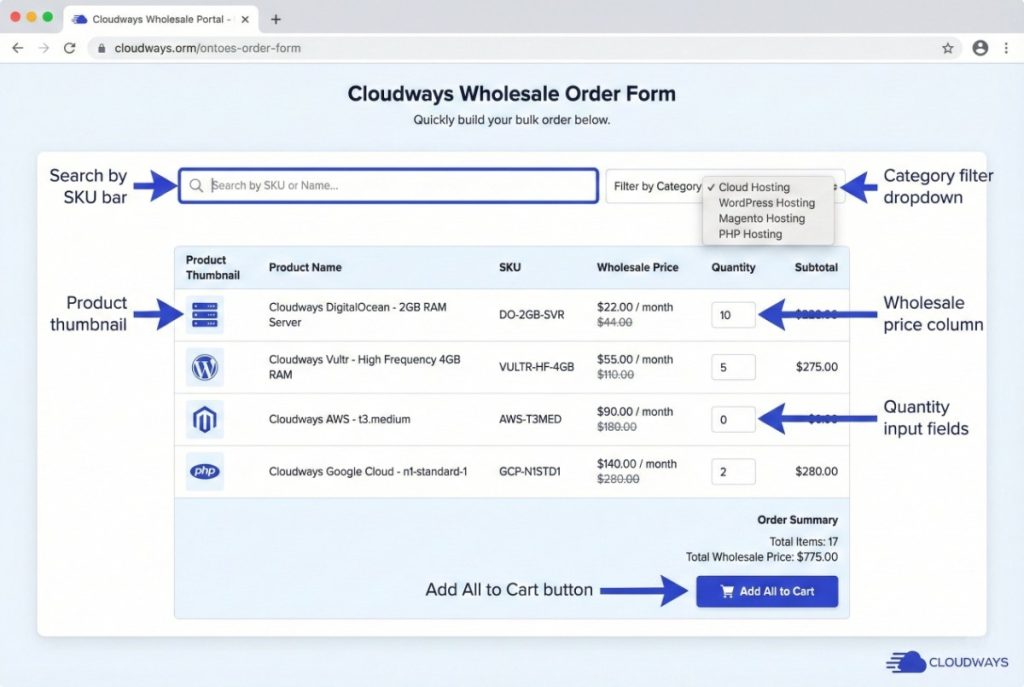 A sample fictitious Wholesale Order form interface.
Hosting Your Wholesale Store: Why Performance Matters
Here’s something most wholesale plugin reviews won’t tell you: the plugin you choose matters far less than the hosting underneath it. A sophisticated wholesale setup adds significant database overhead that can cripple your store on inadequate hosting.
The Hidden Performance Challenge
Wholesale plugins add complexity that standard WooCommerce doesn’t have:
- Dynamic pricing calculations: Every product display requires checking the user’s role, applicable discounts, quantity tiers, and category rules
- Visibility checks: Each product must be evaluated against visibility rules before rendering
- User role lookups: Session data and user meta queries on every page load
- Order form rendering: Loading hundreds of products with their wholesale prices simultaneously
On shared hosting, these operations can increase page load times from 2 seconds to 8+ seconds. For wholesale customers placing large orders, slow checkout pages directly translate to abandoned carts and lost revenue.
The Solution: Object Caching
Object caching stores the results of expensive database queries in memory (Redis or Memcached) so they don’t need to be recalculated on every page load. For wholesale stores, this means:
- Pricing rules calculated once, served instantly on subsequent requests
- Product visibility checks cached per user role
- Order form product lists loaded from memory instead of database
- Cart calculations performed in milliseconds rather than seconds
Cloudways includes Object Cache Pro (a premium Redis client normally priced at $95/year) free on all plans. Combined with the Varnish full-page cache, Cloudflare Enterprise CDN, and pre-configured Nginx stack, you get sub-second load times even with complex wholesale pricing rules across thousands of products.
For stores using WooCommerce’s High-Performance Order Storage (HPOS), Cloudways’ stack is specifically optimized to handle the new table structure efficiently. As your wholesale volume grows, you can scale your WooCommerce store vertically with one click or leverage Cloudways Autonomous for automatic horizontal scaling during traffic spikes.
Conclusion: Choosing the Right Wholesale Plugin
The “best” WooCommerce wholesale plugin depends entirely on your specific needs:
- For maximum compatibility and peace of mind: Choose Wholesale for WooCommerce
- For the best bulk ordering experience: Choose Wholesale Suite with the Order Form add-on
- For agencies and developers: Choose Barn2 Wholesale Pro for clean code and private store features
- For budget-conscious starters: Start with the free Wholesale Prices plugin and upgrade as you grow
- For all-in-one feature density: Choose WholesaleX or B2BKing
- For granular quantity controls: Choose Plugin Republic’s Bundle
Remember: your plugin choice is only half the equation. A feature-rich wholesale plugin on slow shared hosting will frustrate your B2B customers and cost you sales. Invest in proper WooCommerce hosting with object caching, and your wholesale store will deliver the fast, professional experience your business buyers expect.
Ready to launch your high-performance B2B store?
Start your free trial on Cloudways and experience the difference proper hosting makes for WooCommerce wholesale operations.
Frequently Asked Questions
Can I run B2B and B2C on the same WooCommerce site?
A) Yes, this is actually the most common setup. All the plugins reviewed above support hybrid B2B/B2C stores. Regular customers see retail prices while logged-in wholesale users see their tiered pricing. You can even hide certain wholesale-only products from retail browsers entirely.
Is there a free WooCommerce wholesale plugin?
A) Yes. The free Wholesale Prices plugin from Wholesale Suite and the free version of WholesaleX both provide basic wholesale functionality at no cost. However, advanced features like order forms, multiple user roles, and product visibility controls typically require premium upgrades.
How do I hide prices from non-logged-in users?
A) Most wholesale plugins include “catalog mode” or “private store” settings. Enable this feature to replace prices with a message like “Login to View Pricing” or “Register for Wholesale Access.” Barn2 Wholesale Pro and WholesaleX offer particularly flexible visibility controls.
Which plugin is best for stores with thousands of products?
A) For large catalogs, prioritize plugins with lazy loading and efficient database queries. Wholesale Suite’s Order Form and Barn2’s Product Table both handle large product counts well. Equally important is your hosting—ensure you have object caching enabled (like Object Cache Pro on Cloudways) to cache pricing calculations.
Do wholesale plugins work with my existing theme?
A) All the plugins reviewed are designed to work with any properly-coded WooCommerce theme. For optimal performance, pair your wholesale plugin with a lightweight theme like GeneratePress or Astra. Check out our guide to the fastest WooCommerce themes for recommendations.
Zain Imran
Zain is an electronics engineer and an MBA who loves to delve deep into technologies to communicate the value they create for businesses. Interested in system architectures, optimizations, and technical documentation, he strives to offer unique insights to readers. Zain is a sports fan and loves indulging in app development as a hobby.