

Key Takeaways
- AI agents handle multi-step jobs across your inbox and store, so you stop copying text manually.
- You can automate routine replies and cart follow-ups while keeping tricky messages in draft mode.
- WordPress MCP and scheduled scans sync stock and flag broken links without risking your live site.
- Cloudways Managed AI Agents and Copilot SmartFix handle setup, updates, and server fixes in a few clicks.
As a small business owner, you probably are planning or have already bought an AI tool to help you save hours on repetitive work. That’s a smart decision, sure. But only after using the tool yourself, you soon realize that you’ve got a fast typist that you need to constantly babysit.
Not exactly what you initially thought, right? Because it isn’t as simple as that. Let’s say you got an AI chatbot to write a client reply. Now it’d require you to copy that text into Gmail, update the CRM manually, and then send a calendar link. Still too much work.
That’s exactly where AI agents jump in. Open-source tools like OpenClaw and Hermes move past that copy-paste routine by connecting directly to your inbox, store, and team chat to finish multi-step jobs on their own. Want to see how these tools plan a task step by step before trying them? Check out our guide on building an AI agent.
And this blog focuses on how you can make the most of these AI agents for your small to mid-sized business.
How AI Agents Handle Customer Support and Sales Leads
A slow reply usually costs you a customer. Say someone asks for a quote while you’re away from your laptop. People rarely wait four hours for an email back when three other businesses sit one search away.
24/7 Replies Across WhatsApp, Email, and Slack
As an online business owner, you’d know that customer questions don’t really come through one messaging platform anymore. One buyer may message you on WhatsApp while you’re unavailable, and before you even check your phone, you see two more emails in your inbox and a Slack ping. And trying to manually manage four different apps while you’re actually running a business isn’t easy or practical.
However, integrating OpenClaw or Hermes with those channels makes it a lot easier and better. Both tools watch your inbox and chat apps in the background and answer all routine questions while you’re busy.
Still, letting an AI reply to paying customers can feel risky. Because you obviously don’t want it guessing your prices or making up refund rules. Thankfully, there’s a solution to that too.
All you have to do is put your working hours and standard rates into a basic text file first. So, whenever anyone enquires about your timings or costings, the tool would pull up that exact info from the file in seconds. And for frustrated buyers or refund requests, this is handled differently. For requests like those, the agent stops replying right there and pushes that chat to Slack for a real person to handle.
Automated Lead Qualification and Call Booking
Basic support is only part of what eats up your day.
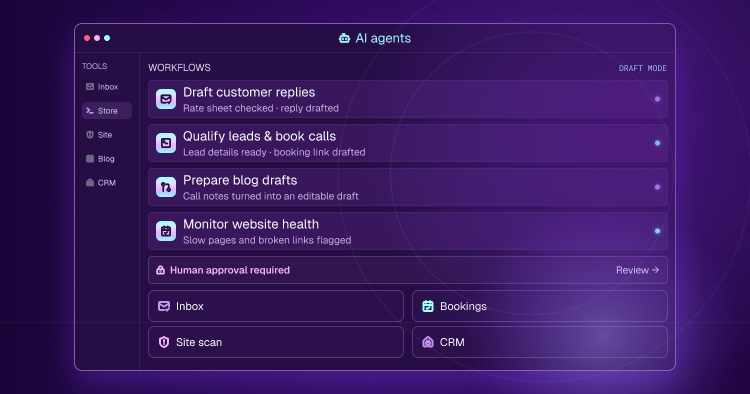
Let’s say a prospect messages asking about hiring your team. The tool would instantly check your rate sheet and ask the customer questions about their timeline. Right after they reply, their contact info goes into your CRM and your calendar link drops directly into the chat.
Also, not every inquiry is that easy to answer, and that’s fine. Maybe someone wants a custom quote or is arguing about an old bill. In scenarios like these, nothing gets sent on its own. You get a draft reply waiting in Slack to check first, and from there on, you can edit the reply or send it as is.
AI Agents for WooCommerce Store Operations and Cart Recovery
Getting visitors to your site is one thing, yet many online stores still lose sales because nobody has time to follow up on abandoned carts or update product pages when supplier stock changes. Let’s see how AI agents help with that.
Personalized Abandoned Cart Follow-Ups and Review Requests
Shoppers leave items in their cart for all kinds of reasons. And blasting everyone with the same generic discount code doesn’t really work. But by integrating AI agents like OpenClaw or Hermes, you can send automated follow-ups based on what each shopper actually looked at.
Suppose someone abandons an expensive item in your store. Now, instead of letting that sale slip away, the agent sends a quick message to ask if they have any questions about sizing or delivery times.
And for first-time buyers whose orders just arrived, a short check-in goes out a few days later to see how everything turned out, and they get a link to leave a review. You can then manually check these replies later if you wish.
Supplier Inventory Syncs via WordPress MCP
A store catalog gets messy fast once you sell dozens of items from different suppliers. Vendors send updated stock lists in rough CSV files, and someone on your team ends up matching part numbers and editing WooCommerce listings manually. An AI agent can take over that CSV matching for you.
However, most store owners hesitate to let an outside tool touch their live site. Because normally, connecting an outside AI tool to your website corresponds to handing over full admin passwords, which makes complete sense to avoid. You can solve that using WordPress MCP, which serves as a safe permission bridge to your store.
Your supplier sheets are automatically compared with your live product pages, so stock counts stay accurate without manual edits. Discontinued items also get flagged before a customer orders something you can no longer ship. And as new products arrive, fresh descriptions and search titles sit as drafts in WordPress, so your team only has to review and publish them.
Launch Your First AI Agent in Minutes
Deploy OpenClaw or Hermes on Cloudways with a 1-click setup, bring your own API key, and automate daily tasks without managing servers.
Using AI Agents for Blog Drafts and WordPress Site Audits
As a small business owner, you may be explaining your work to clients every week. Still, your blog and service pages may remain untouched for months. It is understandable, as most teams don’t have enough time to draft copy from scratch and make regular updates. Let’s explore how AI agents can help you here.
Turn Call Notes and Voice Memos Into Ready-to-Edit Blog Posts
Your best content ideas are already sitting inside client call notes and quick voice memos on your phone. All you have to do is feed that exact info to OpenClaw or Hermes. The agents then use those rough notes and organize your points into a full blog draft that matches how your team actually talks.
Once someone on your team edits the draft and hits publish in WordPress, the agent pulls the main takeaways into a short email newsletter and a couple of social updates.
Catch Broken Links and Outdated Service Pages Automatically
As a business owner, you must ensure that your store’s pages are updated with accurate information. Publishing new content wouldn’t help much if the existing pages on your site are showing last year’s pricing.
Or worse, if they’re broken and sending visitors to dead links. And checking every page manually isn’t easy, especially once your site grows beyond 20 or 30 pages.
But this can also be automated with an AI agent that you can set to scan your live site once or twice a week to flag broken links, missing page descriptions, or outdated service details. So, instead of digging through multiple tabs yourself, your team gets a list of quick page fixes that they can make immediately.
AI Agents for Website Monitoring and Server Fixes
All the time and effort you put into customer support and creating content goes to waste the second your website becomes slow or stops working. And most small businesses don’t have an in-house IT person sitting around watching server health all day.
Spotting Site Slowdowns Before Customers Notice
A bad plugin update or a sudden spike in bot traffic can stall your checkout page hours before you notice it. Plus, a potential buyer finding out that your site went down isn’t exactly what you want.
To avoid this, you can connect a monitoring AI agent to your server that constantly checks page load times and error logs in the background. So, whenever something starts acting up, the tool displays the exact error in plain English instead of leaving you to sift through raw server logs. Doing so will let you know what broke along with its details, even while you’re away from your desk.
Resolving Server Issues With Cloudways Copilot SmartFix
Getting an alert is great, sure. Still, knowing your site is slow doesn’t help much if you have to wait half a day for someone to fix it.
But if you’re on Cloudways, you get Cloudways Copilot on Flexible servers that watches your server around the clock and catches performance issues before they turn into full outages. It also lets you track down common problems like stuck cache files, full disk space, or sudden memory spikes with Copilot’s SmartFix feature inside the dashboard.
So you no longer have to touch a command line or guess which setting broke. You can apply safe and guided fixes with a few clicks.
How to Get Started With AI Agents for Your Small Business
Setting up an open-source AI agent on your own usually means dealing with Docker files, security patches, and server updates every time a new version drops. And taking care of all that yourself while trying to manage a business could be somewhat challenging.
But there’s an easier and better way to make this happen.
With Cloudways Managed AI Agents, you can launch your agent in minutes with quick 1-click setup. Both OpenClaw and Hermes run on Cloudways, so it really comes down to how you want to work. Go for OpenClaw if you want full control over specific skills across WhatsApp, Slack, Telegram, and Discord. Or opt for Hermes if you prefer a tool that remembers context across sessions and builds its own reusable skills as it finishes tasks.
Let’s see how easy it is to set up agents on Cloudways:
- Log in to your Cloudways Platform

- Click Managed AI Agents in the left menu
- Then click Deploy Agent
- From there on, name your agent and select from OpenClaw or Hermes
- Pick your region and click Continue
- Select your preferred server size
- Then choose an LLM provider and add its API key (this step is optional)
- Finally, click Deploy Agent and your agent will be live in minutes
Once your agent is live, connect one channel, such as WhatsApp or Slack, and keep it in draft-only mode for the first few days. And if you’re hooking it up to your store via WordPress MCP, clone your site using Cloudways’ free staging first so you can test everything before it touches real customer orders.
Ready to Hand Off Your Repetitive Work?
Start with one simple workflow on Cloudways Managed AI Agents, test it safely, and let Cloudways handle updates and security in the background.
Final Thoughts
Shifting from basic chatbots to actual AI agents isn’t about replacing your team or putting your entire business on autopilot overnight. It’s really just about handing off the repetitive busywork so you can focus on customers and growth.
You don’t need a complicated setup to see the difference either. Start with one small workflow on Cloudways Managed AI Agents, test it safely on staging first, and see how much time you’re getting back before adding anything else.
Q1: How are AI agents different from regular AI chatbots?
A regular chatbot only answers questions inside a chat window, so you still end up copying text and updating your tools by hand. An AI agent connects directly to your inbox, store, and messaging apps to finish multi-step jobs on its own. Because instead of just writing a reply, the tool would check a rate file, log the details, and send the message without someone babysitting every step.
Q2: Do I need coding skills to set up OpenClaw or Hermes on Cloudways?
No, you don’t need to write code or manage servers from a command line. Through Cloudways Managed AI Agents, both OpenClaw and Hermes come ready to launch right from your dashboard. All you have to do is pick your agent, paste in your model API key, and link your messaging channels.
Q3: How do I stop an AI agent from making unwanted changes to my live WooCommerce store?
You can control what the agent touches in a couple of ways. First, connecting through WordPress MCP lets you limit permissions so the tool only saves drafts instead of editing live pages directly. And if you host on Cloudways, you can clone your site using free staging first and test every workflow safely before pointing it at real customer orders.
Q4: Which AI models work with Cloudways Managed AI Agents?
Cloudways uses a Bring Your Own Key (BYOK) setup, so you aren’t locked into one provider. You can plug in your own API key from OpenAI, Anthropic, Google AI, or OpenRouter depending on the speed and pricing that fits your budget.
Q5: What is the safest task to automate first with an AI agent?
Start with a draft-only workflow where nothing goes out to customers without a quick human look first. Letting an agent prepare reply drafts or flag broken site links lets you see how it behaves on real data before trusting it with live messages or store updates. And once that first task runs smoothly for a week, adding more becomes a lot easier.
Start Growing with Cloudways Today.
Our Clients Love us because we never compromise on these
[email protected]
Sarim Javaid is a Sr. Content Marketing Manager at Cloudways, where his role involves shaping compelling narratives and strategic content. Skilled at crafting cohesive stories from a flurry of ideas, Sarim's writing is driven by curiosity and a deep fascination with Google's evolving algorithms. Beyond the professional sphere, he's a music and art admirer and an overly-excited person.