





An Agent That
Remembers Your Work
and Gets Better at it
Hermes keeps the context from every project you’ve given it, so you’re not re-explaining yourself every time you come back. The more you use it, the better it gets at the specific things you actually need. Pick a plan, connect your model, and start chatting.
Cloudways manages 600K servers and 1M+ applications.


How Managed Hermes Works
Your server is already set up by the time you sign in. The only thing left to do is start talking to your agent.

Memory That Carries
Across Sessions
Get full context in every new conversation as Hermes stores what it learns in a memory file tied to your account.

Auto-Generated Skills,
Reusable Forever
Every new problem your agent solves becomes a skill you keep, stored in a library that grows the longer your agent works for you.

Setup Takes Hours. We Do
It in Minutes.
Your instance comes fully deployed and installed, with Hermes already running and ready the moment you log in.
What Your Hermes Agent
Actually Handles
Saves repeated workflows as reusable skills to deliver scheduled digests and ready-to-approve drafts.
Marketing
- Tracks keyword gaps and builds recurring SEO research briefs.
- Turns briefs into WordPress drafts matched to your site style.
- Compiles daily ad and traffic digests across your channels.
eCommerce
- Drafts Klaviyo campaigns using past flow performance data.
- Flags stalled shipments and WooCommerce order exceptions.
- Watches competitor pricing and flags new store reviews.
Engineering
- Summarizes pull requests and ranks open security alerts.
- Catches doc drift after code merges and triages new issues.
- Sends scheduled server health and vulnerability digests.
Business
- Compiles morning digests from your inbox, calendar, and tasks.
- Learns your tone to sort emails and draft replies.
- Logs new CRM leads and drafts invoices for quick approval.

Managed From the Moment You Launch
Maintenance Handled by Cloudways
Cloudways handles server operations & security updates. Connect your AI model, a messaging channel, and start chatting.
Validated Updates
Before a new Hermes release reaches your instance, Cloudways tests it and holds back any version with known regressions.
Control Over Your Setup
Pick your plan, region, and AI model. Terminal access on every plan lets you go deeper while Cloudways manages the infrastructure.
Deploy in Minutes,
Customize However You Want
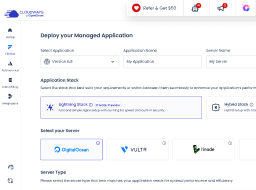
All you need is an API key and a plan to run your agent. Nothing more technical than that.

Step 01
Sign Up for Cloudways
Create your account and pick a plan, then choose the server location closest to you.

Step 02
Connect Your AI Model
Link your preferred LLM and messaging channels so you can start talking to your Hermes agent.

Step 03
Watch It Learn
Chat with your agent within minutes, and it starts building skills right away.
Everything Your Hermes Agent Needs, Built In
Security Runs in
the Background
Each agent runs on its own isolated server, and Cloudways applies security updates in the background.
Validated Hermes Updates
Cloudways runs its own evaluation on every new Hermes release before it reaches your instance.
Backups With One-Click Restore
Automated backups cover your agent’s memory and skills, and a single click in your dashboard restores them.
An Inbox for
Your Agent
Every plan includes AgentMail, which gives your agent its own email inbox.
Talk to Your Agent, Wherever You Are
Chat with Hermes on Telegram, WhatsApp, Discord, or Slack. Terminal access lets you build custom integrations.
Your Choice of AI Model & Provider
Connect your OpenAI account through OAuth, or add your own key from Anthropic, DigitalOcean, Gemini, OpenAI, or OpenRouter. Your provider bills you directly.
Pick Where Your Agent Lives
Choose the region where your agent’s server runs to support your data residency needs. You set it when you launch.
Terminal Access for Power Users
Run Hermes CLI commands and debug your agent directly, with terminal access included on every plan.
Simple pricing. No surprises.
No
Lock-in.
Pay only for the server you run. No hidden fees, no bundled credits, and no renewal penalties.
Managed Hermes Agent Hosting for the Way You Work
A developer debugging workflows and an agency managing client agents need different things from their hosting.
Full Access,
Full Control
You get terminal access, isolated sub-agents, and complete visibility into specs, costs, and performance.
Start Building
One Agent Setup,
Reused Across Every Client
You get managed security, automated backups, and proactive monitoring for every client’s agent, with each one carrying forward the skills it’s already built from past work.
Start Building
An Agent That Keeps
Improving on Its Own
Your server, security, and backups are handled, so you get an agent that grows more capable the more you use it.
Start Building
The Agent Handles
the Busywork
You get managed security and automated backups while repetitive tasks run on their own, handled by an agent that’s already set up and ready to go.
Start Building
What Teams Say After Switching to Hermes
The part about connecting agents through the API is what people keep mentioning.

The API, especially the MCP server, it’s fantastic. I love using it because I can hook up my AI agents to it and it will just do everything for me.
Frequently Asked Questions
Does the Black Friday offer apply to Hermes agent hosting?
Yes, this offer applies to Hermes agent hosting. Create a new account using code BFCM802 by December 4 and receive 80% off the first 2 months of your Hermes plan, up to $200 off per month. For example, the Swarm plan at $79.99 comes to around $16 a month. Your AI provider bills model usage separately.
What is Hermes, and do I need any experience?
Hermes is an open-source AI agent developed by Nous Research that learns from your input. It stores this information in its memory and creates reusable skills to help solve problems. It can run 24/7 on your chosen AI model. As a beginner, you can get started right away because Cloudways handles the server setup, security, and updates. A basic knowledge of AI tools and API keys helps you get the most out of your agent, and power users can go deeper with terminal access.
How do I deploy Hermes?
You deploy Hermes in three steps from the Cloudways dashboard. First, create an account and select your plan and server location. Next, connect your AI model using an API key from your provider. Finally, connect the messaging platform you want to chat on. Cloudways then deploys the server and installs Hermes, which takes a few minutes.
How much does Hermes agent hosting cost?
Hermes agent hosting starts at $9.99 per month on the Scout plan and goes up to $79.99 per month on the Swarm plan. Two other plans sit in between, Operator at $19.99 and Squad at $39.99. Each step up adds CPU, memory, storage, and bandwidth. Every plan runs one Hermes agent on its own server. Your AI provider bills model usage separately. The pricing section lists the full specs of each plan.
Which messaging platforms can Hermes use on Cloudways?
Hermes works with Discord, Telegram, WhatsApp, and Slack, and you connect them through the Cloudways dashboard. Every channel connects to a single agent with a single memory. This means that if you start a conversation on your phone, it continues in your terminal.
What is BYOK, and which AI providers can I use?
BYOK stands for Bring Your Own Key. It means you provide your own API key, and your AI provider charges you directly for model usage. Cloudways supports Anthropic, DigitalOcean, Gemini, OpenAI, and OpenRouter. You enter your key in the Cloudways dashboard during deployment. Hermes then uses it to authenticate your requests to your chosen provider. OpenAI accounts can also connect through OAuth, with Anthropic OAuth coming soon. You can rotate or revoke your key from your provider’s dashboard.
How does Hermes use memory?
Hermes stores the information it has learned in its memory. When you start a new conversation, it can draw on the context saved from earlier ones. That context can include your projects, tools, and preferences. Hermes decides what to store, but you can ask it to save any specific detail.
How does Hermes create skills and get better?
When Hermes solves a new problem, it creates a reusable skill. It saves the skill on your instance in the agentskills.io format. When a similar task comes up, it uses that skill, so repeat requests move faster. Skills are searchable, and the open format lets you share them.
What can my Hermes agent do?
Hermes works best on repetitive tasks like topic and competitor tracking, and it sends summaries at the time you choose. It can also handle research tasks that use web search, browser control, and vision. Developers can run code-management pipelines with human oversight. Each new type of task becomes a skill, which makes later requests quicker.
How is Hermes different from OpenClaw, and which should I use?
The main difference between Hermes and OpenClaw lies in how they acquire their capabilities. Hermes creates its own skills and remembers your projects and preferences, so it improves with each run. OpenClaw follows set workflows and relies on community-created skills, which suits repetitive tasks with approved steps. Hermes, in contrast, adapts to your ever-changing work. Both run on the same managed infrastructure with the same channels and model options. You can also run both on one account as separate instances. The Cloudways Managed AI Agents overview compares the two.
Can my Hermes agent access my personal files or work documents?
Your agent has access only to what you connect. It runs on a dedicated instance on Cloudways infrastructure, separate from your laptop, work machine, and cloud drive. Its access covers its own workspace, your AI model, and your messaging platform.
Can I self-host Hermes?
Yes, Hermes is open source, which means anyone can host it. Self-hosting involves installing Hermes on a server you rent or own and keeping it online 24/7. You also handle updates and security yourself. Cloudways takes care of this for you, so you only need to connect a model and a messaging platform. The Hermes documentation has the installation steps.
What does Cloudways manage?
Cloudways manages your server, including setup, security updates, and daily backups. Each agent runs on its own isolated instance. Cloudways tests every Hermes release before deployment and holds back versions with known regressions. If anything goes wrong, you can restore your agent’s memory and skills from a backup with one click. Expert support is also available 24/7.


Black Friday
Ends Soon!

Black Friday Clock Is Ticking!
-
0
Days
-
0
Hours
-
0
Min
-
0
Sec
Get the Deal
*Up to $200 off per month