




WordPress Multisite Hosting, Built for Agencies
Deploy unlimited client sites on one high-performance server, deliver consistent fast load times across your entire network, and scale resources on demand as your business grows.
*3-day free trial, no credit card neededLaunch Your WordPress Multisite Network in Minutes
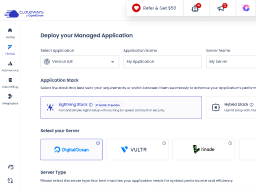
From enabling multisite to managing your first sites, everything happens inside one clean dashboard. No complex setup, no server configuration required.
Everything Your WordPress Multisite Network Needs to Perform at Scale
From server performance to site security, Cloudways gives agencies the infrastructure and tools to run a reliable WordPress Multisite network without the operational overhead.
Optimized Speed
Every site runs on a pre-configured Nginx, Varnish, and Redis stack for fast load times and strong SEO, right out of the box.
Enterprise-Grade Security
Protect your entire network with Cloudflare DDoS mitigation, dedicated firewalls, free SSL certificates, and automatic security updates across all your sites.
24/7 Expert Support
Round the clock access to Cloudways specialists who understand WordPress Multisite, ready to resolve issues before they reach your clients.
Scale As You Grow
Adjust CPU, RAM, and storage in a few clicks as your client base grows, with no migration or downtime required.
Automatic Backups
Daily automated backups across your entire network with one-click restoration, so no update ever becomes a client emergency.
Site Management at Scale
Manage updates, monitor performance, and control user access across every site from a single dashboard with Cloudways Site Manager.
Simple, Pay-as-You-Go Pricing for WordPress Multisite Hosting
Only pay for the resources you actually use, billed hourly with no long-term contracts. Pick from 5 cloud providers and find the right balance of cost and performance for your network.
-
Cloudways Flexible
Customizable managed hosting for WordPress, Magento, Laravel & PHP apps. Full control over server resources and cloud choice.


Lightning Stack - Now Available
-
Cloudways Autonomous
Fully managed hosting for WordPress for dynamic high traffic eCom and LMS sites — built to autoscale for thousands of concurrent users.
Select Cloud Provider
-
Fastest growing & affordable cloud provider with high-performance SSD standard and NVMe storage premium servers across 9 locations. Select the perfect fit from their Basic, General Purpose, and CPU Optimized server lineup.
DigitalOcean
-
Across 30 locations, Vultr provides standard servers featuring SSD storage and high frequency servers with NVMe storage powered by the fastest architecture available in the Vultr product lineup.
Vultr
-
Popular cloud emphasizing consistent performance across 25 datacenters. Choose Linode if you wish top quality performance at a pocket—friendly budget.
Linode
-
Flexible Amazon cloud compute (EC2) with configurable storage/bandwidth across 28 datacenters. AWS supports dynamic vertical scaling with options to both upgrade and downgrade server resources. Select the perfect fit from their Standard and Compute Optimized server lineup.
AWS
-
Google Compute Engine (GCE) is an extremely powerful cloud hosting infrastructure with the efficient performance that comes with Google's brand name. With 28 datacenters, GCE supports dynamic vertical scaling with options to both upgrade and downgrade server resources. Select the perfect fit from their Standard, Compute Optimized and High Compute server lineup.
GoogleCloud
Select Server Type
-
Basic
DigitalOcean is the fastest growing cloud provider.
-
General Purpose
DigitalOcean is the fastest growing cloud provider.
-
CPU Optimized
DigitalOcean is the fastest growing cloud provider.
-
Standard
DigitalOcean is the fastest growing cloud provider.
-
Standard
DigitalOcean Standard Droplets, powered by 2nd generation or earlier Intel CPUs and standard SSD, are perfect for general-purpose workloads and all your applications, offering networking speeds up to 2 Gbps.
-
Premium
DigitalOcean Premium Droplets are powered by 2nd or 3rd Generation Intel Xeon Scalable processors and faster NVME storage delivering higher network throughput up to 10 Gbps for your most demanding applications.
Micro
Suitable for personal websites and simple blogs.
$11
$11
USD per month
You pay $0.0357 hourly
- 2GB RAM
- 1 vCPU
- 50GB Storage
- 2TB Transfer Bandwidth
- 4 Free AI Copilot Credits
-
Lightning Stack


- Unlimited Visits
- Unlimited Websites
Small
Suitable for growing businesses & moderate traffic.
$11
$11
USD per month
You pay $0.0357 hourly
- 2GB RAM
- 1 vCPU
- 50GB Storage
- 2TB Transfer Bandwidth
- 4 Free AI Copilot Credits
-
Lightning Stack
- Unlimited Visits
- Unlimited Websites
Most Popular
Medium
Supports more demanding websites with higher traffic.
$11
$88
USD per month
You pay $0.1310 hourly
- 8GB RAM
- 4 vCPU
- 160GB Storage
- 5TB Transfer Bandwidth
- 4 Free AI Copilot Credits
-
Lightning Stack
- Unlimited Visits
- Unlimited Websites
8XL
Ideal for e-com stores and resource-intensive applications.
$11
USD per month
You pay $1.0848 hourly
- 128GB RAM
- 24 vCPU
- 2560GB Storage
- 11TB Transfer Bandwidth
-
4 Free
 AI Copilot Credits
-
Lightning Stack
- Unlimited Visits
- Unlimited Websites
$0.033/GB per server will be applied for offsite backup storage.
Free Trial
Try Autonomous' simplicity and autoscaling before committing.
$100
$0For 3 Days


Plan Includes
Website: 01
Baseline Autoscale Servers: 01
Bandwidth: 150 GB
Disk space: 20 GB
Visits: Unmetered
PHP Workers: 100/server
Features Included
 True Autoscaling
Cloudflare Enterprise CDN
Redis Caching
Object Cache Pro + Relay
True Autoscaling
Cloudflare Enterprise CDN
Redis Caching
Object Cache Pro + Relay
 Free Managed Migration
Growth
For applications with growing traffic needs.
$100
$99/Month
Plan Includes
Website: 01
Baseline Autoscale Servers: 01
Bandwidth: 150 GB
Disk space: 20 GB
Visits: Unmetered
PHP Workers: 100/server
Features Included
True Autoscaling
Cloudflare Enterprise CDN
Redis Caching
Object Cache Pro + Relay
Free Managed Migration
Additional Charges
- Disk Space: $1/GB
- Bandwidth: $0.04/GB
- Autoscaling: $0.07/hr/server beyond baseline
Recommended
Scale
For applications managing consistent traffic growth.
$100
$199/Month
Plan Includes
Website: 01
Baseline Autoscale Servers: 02
Bandwidth: 250 GB
Disk space: 50 GB
Visits: Unmetered
PHP Workers: 100/server
Features Included
True Autoscaling
Cloudflare Enterprise CDN
Redis Caching
Object Cache Pro + Relay
Free Managed Migration
Additional Charges
- Disk Space: $1/GB
- Bandwidth: $0.04/GB
- Autoscaling: $0.10/hr/server beyond baseline
Plus
For large scale applications with critical traffic needs.
$100
$399/Month

Plan Includes
Website: 01
Baseline Autoscale Servers: 03
Bandwidth: 1000 GB
Disk space: 100 GB
Visits: Unmetered
PHP Workers: 100/server
Features Included
True Autoscaling
Cloudflare Enterprise CDN
Redis Caching
Object Cache Pro + Relay
Free Managed Migration
Additional Charges
- Disk Space: $1/GB
- Bandwidth: $0.04/GB
- Autoscaling: $0.12/hr/server beyond baseline
Enterprise
Need more than standard plans? We’ll create a custom plan.
Custom
Optimized resources for your traffic and usage patterns.
Custom resource allocation and baseline capacity.
Expert consultation to match plan to requirements.
Addons Built for High-Performance WordPress Multisite Networks
From security and performance to site management at scale, every addon is built to reduce overhead and keep your client network running smoothly.
Enterprise Cloudflare CDN
Speed up every site with Edge Page Caching, Argo Smart Routing, and enterprise Cloudflare features built for WordPress networks.
Starts at $4.99/domain/mon >
Starts at $4.99 $2.49/domain/mon >
Cloudways SafeUpdates
Automatically test and apply WordPress core, plugin, and theme updates across your sites, with rollback built in if anything breaks.
Starts at $3/app/mon >
Starts at $3 $1.5/app/mon >
Malware Protection
Proactively scan and automatically remove malware across every site in your network before it impacts your clients.
Starts at $4/app/month >
Starts at $4 $2/app/mon >

Cloudways Site Manager
Manage updates, monitor performance, and control user access across your entire client portfolio from one centralized dashboard.
Starts at $2/site/mon >
Starts at $2/site/mon >
New
Advanced Support Addon
Direct access to Cloudways specialists for troubleshooting, performance optimization, and hands-on technical support.
$100/month ($25 offer) >
Starts at $100 $50/app/mon >
DNS Made Easy
Cut DNS propagation times and manage domain records across your entire network with fast TTLs and instant updates.
$0.50/month/domain >
Starts at $0.50 $0.25/app/mon >
Real Success Stories. Powered By Cloudways.
Read real-life case studies of companies that used our managed cloud server hosting to take their online businesses to the next level!


Improved site speed by 40% and increased course bookings across AU.
Mo Soltany
Business Development Manager


Cut hosting cost 80% while serving 17M+ users across 160+ countries.
Bryan Feinberg
Founder and CEO


Saw 600% growth, and our homepage achieved a perfect 100% score.
Stephan Eijer
Owner


Managed over $1M in sales and a 200% traffic spike seamlessly.
Sol Lee
Co-founder


Doubled site speed, 20% traffic growth & 50% faster load times.
Great Opomu
Chief WordPress Officer


Scaled to 140+ client sites & hit $1M ARR as performance soared.
Andrew Jackson
Founder & CEO


Streamlined operations for 60+ businesses with reliable performance.
Michelle Coe
President and Senior Creative Director


Saved 25–30% on hosting costs with 40% faster server response time.
Roberto M. Filho
Founder and CEO


30% faster, 280+ sites scaled, $10M+ revenue growth, this year.
Tristan Gatellier
CEO


Achieved 99 PageSpeed score, zero downtime and scalable growth.
Joost Rust
Director


Reduced server costs by 50% and homepage load time dropped to 1.2s.
Florence Luo
Owner and CEO


Grew monthly readership 3x from 3M to 9M after moving to Cloudways.
Simon Treulle
CEO


Improved store speed by 30%, which led to a 22% increase in conversions.
Yogita Khasturi
Co-Founder
Managed over $1M in sales and a 200% traffic spike seamlessly.
Sol Lee
Co-founder


Posted 2.6M views and earned $600K in commissions so rewarding.
Adam Connell
Founder


Handled 20x traffic spikes on 18-year-old site with 5,484 articles.
Jonathan Bailey
Founder


Resulted in a perfect 100% PageSpeed score and 600K page views.
Michael Donovan
Co-founder


Boosted monthly pageviews to 200K, leading to a 6-figure valuation.
Daniel Shuttleworth
Founder


Experienced a 3x increase in traffic and revenue, with 100% speed.
Keith Mint
Founder

Migrate For Free Without Any Glitches.
We’ll move your first website to Cloudways from any web host for FREE (Without breaking your site hosted on the old host).
Migrate My Website.Frequently Asked Questions
What should I look for when choosing a WordPress Multisite hosting provider?
Look for a host that offers scalable cloud infrastructure, automated backups, staging environments, and centralized site management. Cloudways gives you all of these out of the box, with a choice of five cloud providers and a pre-optimized server stack built for WordPress performance.
Does Cloudways offer staging for WordPress Multisite?
Yes. Every Cloudways plan includes a one-click staging environment, so you can safely test updates, plugin changes, and design tweaks before pushing them live across your network.
What is WordPress Multisite?
Multisite in WordPress allows for the centralized management of multiple websites from a single WordPress dashboard, making it a convenient option for companies and brands.
For example, if you have 3 different WordPress websites, you'd have to log out of one dashboard to work on another. But with multisite, you can log in to a single WordPress dashboard and quickly switch between different sites using a dropdown menu.
When should we use multisite hosting for WordPress?
Multisite hosting is ideal for people looking to save time and conveniently manage multiple WordPress websites.
With multisite, you can add/remove/update plugins and themes across all the sites within the network, reducing the time and effort required to install and update these assets on an individual site.
Does WordPress multisite install count as 1 WP installation?
Yes, WordPress multisite counts as a single WordPress installation, as you can host multiple domains on a single network.
How many maximum sites can be managed by hosting for WordPress Multisite server?
There is no fixed limit. You can host unlimited WordPress sites on a single Cloudways server, with the only constraint being your server's available resources. You can scale those resources up at any time.
Can I use any themes and plugins for my WordPress multisite network?
Yes, you can use multiple plugins and themes with similar functionality for different websites in a WordPress multisite network. However, you need to specifically select the website on which you want to use them. If you activate the plugin or a theme for the entire network, it will automatically apply to all sites within the network.
Does the WordPress performance increases or decrease with hosting for multisite?
Not on Cloudways. Every server runs on a pre-configured Nginx, Varnish, and Redis stack optimized for WordPress, ensuring consistent performance across your entire network regardless of how many sites you add.
What is the difference between hosting for WordPress vs. hosting for WordPress Multisite?
Hosting for WordPress is specifically optimized for running a single site. It often comes with pre-installed WordPress software, automatic updates, and technical support designed for WordPress users.
On the other hand, hosting for WordPress multisite is specifically designed to support a multisite network, helping you manage multiple sites from a single dashboard. It offers the same features as regular hosting for WordPress but with additional technical support and optimizations to handle the added complexity of managing multiple sites.
How to manage domain mapping with WordPress Multisite on Cloudways?
Mapping your WordPress multisite domains is straightforward with the Cloudways Application Management panel. Follow the steps below:
- Go to the Application Management Panel > Domain Management
- Fill in the Primary Domain field and click Save Changes.
- And for other subdomains, add them in the Additional Domains field.
Can we host a single site and multisite on the same Cloudways server?
Yes, we can host multiple applications (a single WordPress site and multisite) on the same Cloudways server.
Can Cloudways handle a large WordPress Multisite network?
Yes. Cloudways is built to scale with your network. Adjust CPU, RAM, and storage on demand as your site count grows, and use Site Manager to manage updates, monitor performance, and maintain visibility across hundreds of sites from one dashboard.
Can I switch between a WordPress Multisite and a single site setup?
Yes. You can convert a WordPress Multisite network back to a single site, or set up a new multisite from an existing single site installation. Both can be done manually or using a plugin, and Cloudways support is available to guide you through the process.
What makes Cloudways the best choice for WordPress Multisite hosting?
Cloudways gives you managed cloud infrastructure from five top providers, a pre-optimized Lightning Stack for consistent WordPress performance, and tools purpose-built for agencies managing multiple sites. Every plan includes automated backups, free SSL, staging environments, and AI Copilot for instant server issue detection and resolution. With Site Manager, you can manage updates, monitor performance, and control user access across your entire client portfolio from one dashboard.
How does Cloudways keep my WordPress Multisite network secure?
Every Cloudways server is protected by a dedicated firewall, free SSL certificates, and Cloudflare DDoS mitigation. Automated security patches are applied regularly across your network, and the built-in WordPress Vulnerability Scanner flags threats before they cause damage. For additional protection, Malware Protection scans and removes threats automatically across all your sites.

