EXPLORE CLOUDWAYS
Experience lightning-fast loading times and seamless platform
View Demo >Biggest-Ever

Days
Hours
Min
Sec
Across Hosting Plans, AI Agents,
AI Website Builder & Add-Ons
*Up to $200 off per month
PRODUCTS 80% Off
CLOUD PROVIDERS
SUPPORTED APPS
WHO WE SERVE
PARTNERSHIP PROGRAMS
POWERFUL FEATURES
DISCOVER
WHY CLOUDWAYS
 Read Case Study >
Jesse Tutt
Founder & CEO

Deploy Laravel apps faster on production-ready cloud infrastructure, fully managed by Cloudways. Your servers stay patched and secure without you lifting a finger. Scale on demand and pay only for what you use, no contracts.
Free trial, no credit card neededLaunch servers, set up staging, back up your app, clone environments, and scale resources without ever opening a terminal. See how it works.
Laravel Apps
CSAT Score
Data Centers
Secure and performance-focused Laravel cloud hosting that lets you easily host your Laravel project and focus on the things that really make a difference.
SSD storage makes your Laravel app respond faster for every user, since data transfers significantly quicker than traditional storage.
Built-in caching tools like Memcached, Varnish, and Redis keep your Laravel app running fast while reducing the load on your database.
Our hosting stack comprises NGINX, Apache, MySQL/MariaDB, and PHP-FPM to tackle high volume traffic and server requests resulting in better performance and faster load times.
Host your Laravel app on a PHP 8 ready server that’s significantly faster, more secure, and more versatile than older versions.
Expedite your websites, get constant availability, and secure them against DDoS attacks & malicious traffic with the Cloudflare add-on.
A modern NGINX and PHP-FPM architecture built for speed, better concurrency handling, and smoother backend responsiveness. Available at no extra cost.
Our platform-level firewalls protect your Laravel server against attacks such as IP spoofing, phishing, and everything that’s not authorized.
Get a free Let’s Encrypt SSL certificate with our Laravel hosting to keep your site secure and trusted.
We protect your account with 2FA and also notify you of any login attempts made from an unidentified device.
You can create a whitelist of IP addresses for unrestricted access over regions and networks through SSH and SFTP.
Run multiple Laravel apps on a single server, each with dedicated resources so your projects stay organized.
Valuable data of your Laravel app is well protected and is only allowed to be accessed remotely via whitelisted IP addresses.
Choose from 150+ data centers of world-class providers such as DigitalOcean, Amazon AWS, Linode, Vultr, & Google GCP for fast Laravel apps.
Leverage high-performance block storage service while expanding your storage flexibly without changing other server parameters.
Scale up your server resources such as RAM, CPU, and storage for high-availability and performance at the lowest possible costs.
With pay-as-you-go plans, you only need to pay for the resources you use. Never pay a fixed amount or enter into any contract.
Our 1-click actions allow you to perform several operational tasks, such as backup/restore, website/server cloning in no time.
Run your Laravel app on the PHP version that works best for you. Easily switch between PHP 7.4, 8.0, 8.1, 8.3, and 8.4 anytime.
We offer 24/7 live chat support in all areas to help you run your Laravel apps without any hiccups.
Join our dynamic community of Laravel experts, dedicated to sharing their skills and knowledge to support users worldwide.
We have a centralized resource center for our customers. You can refer to the Knowledge Base for any help related to our platform.
Leave your queries through our ticketing system to avoid waiting in queues. Our engineers respond promptly to every query.
We offer advanced and premium add-ons for priority support. Tell us about your requirements and we’ll take care of it.
We have a server and application monitoring tool for troubleshooting. You also can contact our support engineers to take you out of the situation.
Pre-installed Git on our managed Laravel hosting platform helps you set up auto-deployment on your live servers without worrying about code changes.
SSH and SFTP allow you to securely access servers and update files for your application. You can also create SFTP credentials for your team members.
Make copies of your Laravel Hosting app or clone the entire server in just 1-click. You will get new staging URLs for themes/plugins compatibility testing, etc.
It is easy to split projects between relevant teams since we allow one team member to be a part of different teams for collaboration.
We offer free staging URLs and areas that you can use while setting up, testing, and developing your Laravel apps.
You can divide work within the team, regardless of their location and assign them full or limited access to your Laravel app or server.

Founder & CEO, Brand on Fire

CEO, ClassBento

Founder, Biiird.com

Just request a migration and our team takes it from there. Files, databases, configuration, and going live on faster infrastructure, all handled with minimal to zero downtime. Free until June 30th.
Start My Free MigrationsPay only for the server resources you use. Host unlimited Laravel apps, pick your cloud provider, and scale up or down anytime without changing plans.
Managed Node.js hosting for full-stack apps, APIs & automation. No cold starts, Git-based deployments, and flat, predictable monthly pricing.
$20
$20
/MonthFeatures Included
 Enterprise CDN DDoS Protection Malware Protection
$30
$30
/MonthFeatures Included
Enterprise CDN DDoS Protection Malware Protection$50
$50
/MonthFeatures Included
Enterprise CDN DDoS Protection Malware Protection$100
$100
/MonthFeatures Included
Enterprise CDN DDoS Protection Malware Protection$150
$150
/MonthFeatures Included
Enterprise CDN DDoS Protection Malware Protection$300
$300
/MonthFeatures Included
Enterprise CDN DDoS Protection Malware Protection$400
$400
/MonthFeatures Included
Enterprise CDN DDoS Protection Malware ProtectionUpgrade or downgrade anytime no lock-in.
A charge of $0.033/GB applies to offsite backup storage.
A charge of $0.02/GB applies to any CDN bandwidth used beyond your plan's allocation.
An additional charge of $1/10GB disk storage applies.
Deploy OpenClaw or Hermes on secured and managed infrastructure in minutes. No manual setup required.
Light reconnaissance, one or two simple workflows
$9.99
/Month
Active single-purpose agent doing real work
$19.99
/Month
Multiple sub-agents coordinating on tasks
$39.99
/Month
Many agents, many tools, always-on autonomy
$79.99
/Month
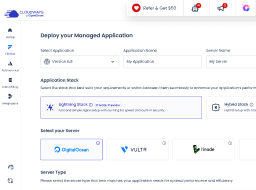
Select Cloud Provider
Fastest growing & affordable cloud provider with high-performance SSD standard and NVMe storage premium servers across 9 locations. Select the perfect fit from their Basic, General Purpose, and CPU Optimized server lineup.
DigitalOcean
Across 30 locations, Vultr provides standard servers featuring SSD storage and high frequency servers with NVMe storage powered by the fastest architecture available in the Vultr product lineup.
Vultr
Popular cloud emphasizing consistent performance across 25 datacenters. Choose Linode if you wish top quality performance at a pocket—friendly budget.
Linode
Flexible Amazon cloud compute (EC2) with configurable storage/bandwidth across 28 datacenters. AWS supports dynamic vertical scaling with options to both upgrade and downgrade server resources. Select the perfect fit from their Standard and Compute Optimized server lineup.
AWS
Google Compute Engine (GCE) is an extremely powerful cloud hosting infrastructure with the efficient performance that comes with Google's brand name. With 28 datacenters, GCE supports dynamic vertical scaling with options to both upgrade and downgrade server resources. Select the perfect fit from their Standard, Compute Optimized and High Compute server lineup.
GoogleCloud
Select Server Type
DigitalOcean is the fastest growing cloud provider.
DigitalOcean is the fastest growing cloud provider.
DigitalOcean is the fastest growing cloud provider.
DigitalOcean is the fastest growing cloud provider.
DigitalOcean Standard Droplets, powered by 2nd generation or earlier Intel CPUs and standard SSD, are perfect for general-purpose workloads and all your applications, offering networking speeds up to 2 Gbps.
DigitalOcean Premium Droplets are powered by 2nd or 3rd Generation Intel Xeon Scalable processors and faster NVME storage delivering higher network throughput up to 10 Gbps for your most demanding applications.
Suitable for personal websites and simple blogs.
USD per month
You pay $0.0208 hourly


Suitable for growing businesses and moderate traffic.
USD per month
You pay $0.0417 hourly
Supports more demanding websites with higher traffic.
USD per month
You pay $0.0804 hourly
Ideal for e-com stores and resource-intensive applications.
USD per month
You pay $0.1473 hourly
 AI Copilot Credits
$0.033/GB per server will be applied for offsite backup storage.
Fully managed hosting for WordPress for dynamic high traffic eCom and LMS sites, built to autoscale for thousands of concurrent users.
Try Autonomous' simplicity and autoscaling before committing.
$100

 True Autoscaling Cloudflare Enterprise CDN Redis Caching Object Cache Pro + Relay
 Free Managed Migration
For applications with growing traffic needs.
$100
True Autoscaling Cloudflare Enterprise CDN Redis Caching Object Cache Pro + Relay Free Managed MigrationRecommended
For applications managing consistent traffic growth.
$100
True Autoscaling Cloudflare Enterprise CDN Redis Caching Object Cache Pro + Relay Free Managed MigrationFor large scale applications with critical traffic needs.
$100
 True Autoscaling Cloudflare Enterprise CDN Redis Caching Object Cache Pro + Relay Free Managed Migration
Need more than standard plans? We’ll create a custom plan.
Optimized resources for your traffic and usage patterns. Custom resource allocation and baseline capacity. Expert consultation to match plan to requirements.Read real-life case studies of companies that used our managed cloud server hosting to take their online businesses to the next level!


Business Development Manager


Founder and CEO


Owner


Co-founder


Chief WordPress Officer


Founder & CEO


President and Senior Creative Director


Founder and CEO


CEO


Director


Owner and CEO


CEO


Co-Founder
Co-founder


Founder


Founder


Co-founder


Founder


Founder
Yes. SSH access on every plan gives you the full Artisan CLI, so migrations, cache clearing, queue management, and anything else you’d run locally works the same way here.
Cloudways runs MySQL/MariaDB for Laravel hosting. It’s already set up when your server launches, so there’s no separate database to install or configure before you start building.
Yes, the Black Friday offer applies to Laravel hosting. Create a new account with code BFCM802 by December 4, and your first 2 months are 80% off, up to $200 off per month. The Micro server at $14, the starting price in your title, comes to $2.80 a month.
Managed Laravel hosting is when the host runs the technical side of your app for you; server setup, security, backups, and updates, instead of leaving that work to you.
That’s what Cloudways does specifically with Laravel. When you launch a Laravel app, it sets up the right PHP version and installs Composer automatically, before you’ve configured a single thing.
You get automated backups, free SSL, and caching through Memcached, Varnish, and Redis, all set up for you from the start.
There’s also a dashboard for managing your servers and apps, staging environments for safely testing changes, a Cloudflare add-on for extra speed and security, and around-the-clock support.
Sign up and pick Laravel as your application type when you launch. Cloudways sets up a server with the right PHP version and installs Composer for you.
After that, you deploy your code by connecting a Git repository, provided it supports Git over SSH.
Traffic spikes get absorbed by scaling your existing server up; RAM, CPU, and storage, right from your dashboard. This is called Vertical Scaling, and it keeps you on your current plan and your current app the whole time.
If spikes hit often and without warning, Cloudways Autonomous handles it differently. It adds servers during the spike and removes them once traffic settles.
You connect a repository that supports Git over SSH. From there, every commit you push can go straight to your live application, just as it would with any Git-based deployment setup.
Your code deploys on its own. You push a change to your repository, and the Cloudways API picks it up and deploys it automatically, without anyone needing to log in and trigger it manually.
This works the same way as standard Git deployment, your repository still needs to support Git over SSH.
Yes to both. Queue workers run through Supervisor, which Cloudways configures for you, and from there you manage them through your dashboard without touching the command line.
The scheduler runs on a cron job Cloudways sets up automatically. If you’re configuring scheduled tasks yourself, set your timezone explicitly rather than relying on the server’s default, that’s a common reason jobs run at the wrong time.
Yes, both are available. Composer gets installed automatically the moment you launch a Laravel app, and SSH access is there from day one, so you can manage dependencies and work on your server the same way you would on your own machine.
You manage it the same way you would anywhere else, by editing the .env file directly over SSH. Cloudways doesn’t touch it or change anything in it on its own.
No. Your server cost is already built into your plan’s price, so your monthly invoice is the only one you’ll see.
Every plan comes with 24/7 live chat, and a ticketing system handles anything that needs more back-and-forth. Need faster turnaround? Advanced and Premium support add-ons put your tickets ahead of the line.
Security comes from a platform-wide firewall, patches applied as soon as they’re released, and backups stored offsite automatically.
SSL follows the same pattern. Every app gets a free Let’s Encrypt certificate you can turn on with one click, or you can bring your own if you’ve already got one.
Cloudways supports PHP 7.4, 8.0, 8.1, 8.3, and 8.4 for Laravel, and switching between them is just a few clicks in your dashboard, nothing close to rebuilding a server.

Black Friday

Days
Hours
Min
Sec
*Up to $200 off per month