






Blog Hosting Optimized for Speed and SEO
Run your blog on a pre-optimized server stack, with fast load times that improve your search rankings, 99.99% uptime, and 24/7 expert support included out of the box.

600,000+
WordPress Sites Hosted

99.99%
Uptime SLA

72
Net Promoter Score (NPS)
Your Blog Loads Faster, Ranks Higher, and Never Goes Down
Every blog loads faster out of the box, thanks to a pre-configured Nginx, Varnish, and Redis stack, benchmarked at up to 30% faster than traditional LAMP stacks for stronger SEO rankings.
Go Live in Minutes
Deploy a fully configured WordPress blog in minutes, with your server stack pre-optimized and ready to perform from day one.
Manage With Ease
Handle everything from backups and updates to cloning and staging from one intuitive dashboard, no technical expertise needed.
Scale as You Grow
Upgrade your server resources in a few clicks as your traffic and audience grow, with no migration required.

Every Feature Your Blog Needs to Perform, Stay Secure, and Grow
From server performance and site security to seamless workflows, every feature is included to help your blog rank higher, load faster, and run reliably.
Lightning Stack
Every blog runs on a pre-configured Nginx, Varnish, and Redis stack for fast load times and strong SEO performance right out of the box.
Built-in Caches
Built-in Memcached, Varnish, and Redis caching layers reduce database load and keep your blog fast under real traffic conditions.
Optimized Stack
Nginx, Apache, MySQL/MariaDB, and PHP-FPM configured and optimized for WordPress, handling traffic spikes without impacting your blog’s performance.
PHP 8 Ready
Run your blog on a PHP 8 ready server for faster page rendering, better WordPress performance, and improved security over previous versions.
Cloudflare
Protect your blog from DDoS attacks and malicious traffic while keeping it fast and available for readers, even during unexpected traffic spikes.
Breeze Plugin
Cloudways’ free, lightweight cache plugin comes pre-installed on every WordPress blog, improving page speed and Core Web Vitals scores out of the box.
Dedicated Firewalls
Platform-level firewalls protect your blog server against IP spoofing, phishing, and unauthorized access, keeping your content and reader data safe.
SSL Certificates
Free Let’s Encrypt SSL certificates keep your readers’ data encrypted, build trust with your audience, and signal credibility to search engines.
Login Security
Your account is protected with two-factor authentication and notifications for any login attempts from unrecognized devices.
IP Whitelisting
Control who can access your blog server by whitelisting trusted IP addresses, adding an extra layer of protection against unauthorized access.
Dedicated Blog Resources
Your blog runs with dedicated server resources, so traffic spikes on other sites never slow yours down.
Database Security
Your blog’s content, user data, and settings are stored securely and only accessible remotely via whitelisted IP addresses.
IaaS Providers
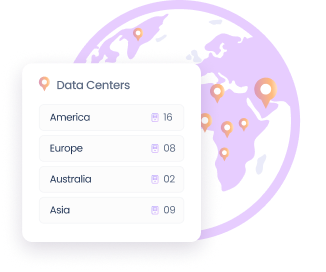
Choose from 150+ data centers across 5 cloud providers in 50+ countries to host your blog closer to your readers for faster load times globally.
Block Storage
Expand your blog’s storage capacity as your media library and content archive grows, without changing any other server settings.
Vertical Scaling
Scale your server’s RAM, CPU, and storage up or down in a few clicks as your blog traffic grows, with no downtime required.
No Contract
Only pay for the resources you actually use, with no fixed monthly commitments or long-term contracts. Start small and scale when you’re ready.
1-Click Actions
Back up your blog, restore a previous version, or clone your entire setup in one click, no technical knowledge required.
PHP Versions
Run your blog on PHP 8.x for faster page rendering and better WordPress performance, with easy version switching available at any time.
24/7 Expert Support
Get round the clock access to Cloudways hosting specialists via live chat, ready to resolve any issue before it impacts your blog’s uptime or traffic.
Cloudways Copilot
Automatically detect and fix server issues using AI, reducing troubleshooting time from hours to minutes without raising a support ticket.
Knowledge Base
Access a comprehensive library of guides, tutorials, and how-tos covering everything from server setup to WordPress performance optimization.
Ticketing System
Submit support tickets directly from your dashboard and get prompt responses from Cloudways engineers for any technical issues.
Advanced Support Addon
Get priority access to Cloudways specialists for hands-on help with plugin and theme troubleshooting, performance optimization, and more.
Troubleshooting
Server and application monitoring tools flag issues automatically, so problems are identified and resolved before they affect your readers or search rankings.
Automated Backups
Schedule automated daily backups of your entire blog and restore any previous version in one click, so a bad update never becomes a permanent problem.
SSH and SFTP Access
Securely access your blog’s server files and make direct updates when needed, with full control over your hosting environment.
1-Click Cloning
Clone your entire blog setup in one click to safely test a new theme, plugin, or redesign before pushing any changes live.
Staging Environment
Test updates, design changes, and new plugins on a staging version of your blog before going live, with no risk to your readers.
1-Click WordPress Installation
Launch a fully configured WordPress blog in minutes with one-click installation, with your server stack pre-optimized and ready from day one.
SafeUpdates
Automatically test and apply WordPress core, plugin, and theme updates with rollback built in if anything breaks.

Migrate Your Client Sites to Cloudways for Free
We’ll move your client websites to Cloudways from any host, with no data loss and no risk to your live sites.
Migrate My Website.Simple, Pay-as-You-Go Pricing for Blog Hosting
Only pay for the resources you actually use, billed hourly with no long-term contracts. Pick from 5 cloud providers to find the right fit for your blog.
-
Cloudways Flexible
Customizable managed hosting for WordPress, Magento, Laravel & PHP apps. Full control over server resources and cloud choice.


Lightning Stack - Now Available
-
Cloudways Autonomous
Fully managed hosting for WordPress for dynamic high traffic eCom and LMS sites — built to autoscale for thousands of concurrent users.
Select Cloud Provider
-
Fastest growing & affordable cloud provider with high-performance SSD standard and NVMe storage premium servers across 9 locations. Select the perfect fit from their Basic, General Purpose, and CPU Optimized server lineup.
DigitalOcean
-
Across 30 locations, Vultr provides standard servers featuring SSD storage and high frequency servers with NVMe storage powered by the fastest architecture available in the Vultr product lineup.
Vultr
-
Popular cloud emphasizing consistent performance across 25 datacenters. Choose Linode if you wish top quality performance at a pocket—friendly budget.
Linode
-
Flexible Amazon cloud compute (EC2) with configurable storage/bandwidth across 28 datacenters. AWS supports dynamic vertical scaling with options to both upgrade and downgrade server resources. Select the perfect fit from their Standard and Compute Optimized server lineup.
AWS
-
Google Compute Engine (GCE) is an extremely powerful cloud hosting infrastructure with the efficient performance that comes with Google's brand name. With 28 datacenters, GCE supports dynamic vertical scaling with options to both upgrade and downgrade server resources. Select the perfect fit from their Standard, Compute Optimized and High Compute server lineup.
GoogleCloud
Select Server Type
-
Basic
DigitalOcean is the fastest growing cloud provider.
-
General Purpose
DigitalOcean is the fastest growing cloud provider.
-
CPU Optimized
DigitalOcean is the fastest growing cloud provider.
-
Standard
DigitalOcean is the fastest growing cloud provider.
-
Standard
DigitalOcean Standard Droplets, powered by 2nd generation or earlier Intel CPUs and standard SSD, are perfect for general-purpose workloads and all your applications, offering networking speeds up to 2 Gbps.
-
Premium
DigitalOcean Premium Droplets are powered by 2nd or 3rd Generation Intel Xeon Scalable processors and faster NVME storage delivering higher network throughput up to 10 Gbps for your most demanding applications.
Micro
Suitable for personal websites and simple blogs.
$11
$11
USD per month
You pay $0.0357 hourly
- 2GB RAM
- 1 vCPU
- 50GB Storage
- 2TB Transfer Bandwidth
- 4 Free AI Copilot Credits
-
Lightning Stack


- Unlimited Visits
- Unlimited Websites
Small
Suitable for growing businesses & moderate traffic.
$11
$11
USD per month
You pay $0.0357 hourly
- 2GB RAM
- 1 vCPU
- 50GB Storage
- 2TB Transfer Bandwidth
- 4 Free AI Copilot Credits
-
Lightning Stack
- Unlimited Visits
- Unlimited Websites
Most Popular
Medium
Supports more demanding websites with higher traffic.
$11
$88
USD per month
You pay $0.1310 hourly
- 8GB RAM
- 4 vCPU
- 160GB Storage
- 5TB Transfer Bandwidth
- 4 Free AI Copilot Credits
-
Lightning Stack
- Unlimited Visits
- Unlimited Websites
8XL
Ideal for e-com stores and resource-intensive applications.
$11
USD per month
You pay $1.0848 hourly
- 128GB RAM
- 24 vCPU
- 2560GB Storage
- 11TB Transfer Bandwidth
-
4 Free
 AI Copilot Credits
-
Lightning Stack
- Unlimited Visits
- Unlimited Websites
$0.033/GB per server will be applied for offsite backup storage.
Free Trial
Try Autonomous' simplicity and autoscaling before committing.
$100
$0For 3 Days


Plan Includes
Website: 01
Baseline Autoscale Servers: 01
Bandwidth: 150 GB
Disk space: 20 GB
Visits: Unmetered
PHP Workers: 100/server
Features Included
 True Autoscaling
Cloudflare Enterprise CDN
Redis Caching
Object Cache Pro + Relay
True Autoscaling
Cloudflare Enterprise CDN
Redis Caching
Object Cache Pro + Relay
 Free Managed Migration
Growth
For applications with growing traffic needs.
$100
$99/Month
Plan Includes
Website: 01
Baseline Autoscale Servers: 01
Bandwidth: 150 GB
Disk space: 20 GB
Visits: Unmetered
PHP Workers: 100/server
Features Included
True Autoscaling
Cloudflare Enterprise CDN
Redis Caching
Object Cache Pro + Relay
Free Managed Migration
Additional Charges
- Disk Space: $1/GB
- Bandwidth: $0.04/GB
- Autoscaling: $0.07/hr/server beyond baseline
Recommended
Scale
For applications managing consistent traffic growth.
$100
$199/Month
Plan Includes
Website: 01
Baseline Autoscale Servers: 02
Bandwidth: 250 GB
Disk space: 50 GB
Visits: Unmetered
PHP Workers: 100/server
Features Included
True Autoscaling
Cloudflare Enterprise CDN
Redis Caching
Object Cache Pro + Relay
Free Managed Migration
Additional Charges
- Disk Space: $1/GB
- Bandwidth: $0.04/GB
- Autoscaling: $0.10/hr/server beyond baseline
Plus
For large scale applications with critical traffic needs.
$100
$399/Month

Plan Includes
Website: 01
Baseline Autoscale Servers: 03
Bandwidth: 1000 GB
Disk space: 100 GB
Visits: Unmetered
PHP Workers: 100/server
Features Included
True Autoscaling
Cloudflare Enterprise CDN
Redis Caching
Object Cache Pro + Relay
Free Managed Migration
Additional Charges
- Disk Space: $1/GB
- Bandwidth: $0.04/GB
- Autoscaling: $0.12/hr/server beyond baseline
Enterprise
Need more than standard plans? We’ll create a custom plan.
Custom
Optimized resources for your traffic and usage patterns.
Custom resource allocation and baseline capacity.
Expert consultation to match plan to requirements.
Built for Bloggers Who Want to Grow Their Audience and Income
From WordPress-optimized performance and rock-solid uptime to faster load times that keep readers engaged, every feature is designed around what bloggers actually need.
Optimized for WordPress
Every blog launches on a server stack pre-configured for WordPress, delivering fast load times and strong Core Web Vitals scores right out of the box.
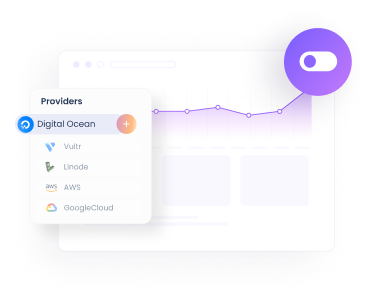
99.99% Uptime SLA
Keep your blog online and accessible to readers around the clock, backed by a 99.99% uptime SLA and enterprise-grade infrastructure built for reliability.
Built to Monetize
Faster load times reduce bounce rates and keep readers engaged longer, directly improving ad revenue, affiliate conversions, and subscriber growth.
Real Success Stories. Powered By Cloudways.
Read real-life case studies of companies that used our managed cloud server hosting to take their online businesses to the next level!


Improved site speed by 40% and increased course bookings across AU.
Mo Soltany
Business Development Manager


Cut hosting cost 80% while serving 17M+ users across 160+ countries.
Bryan Feinberg
Founder and CEO


Saw 600% growth, and our homepage achieved a perfect 100% score.
Stephan Eijer
Owner


Managed over $1M in sales and a 200% traffic spike seamlessly.
Sol Lee
Co-founder


Doubled site speed, 20% traffic growth & 50% faster load times.
Great Opomu
Chief WordPress Officer


Scaled to 140+ client sites & hit $1M ARR as performance soared.
Andrew Jackson
Founder & CEO


Streamlined operations for 60+ businesses with reliable performance.
Michelle Coe
President and Senior Creative Director


Saved 25–30% on hosting costs with 40% faster server response time.
Roberto M. Filho
Founder and CEO


30% faster, 280+ sites scaled, $10M+ revenue growth, this year.
Tristan Gatellier
CEO


Achieved 99 PageSpeed score, zero downtime and scalable growth.
Joost Rust
Director


Reduced server costs by 50% and homepage load time dropped to 1.2s.
Florence Luo
Owner and CEO


Grew monthly readership 3x from 3M to 9M after moving to Cloudways.
Simon Treulle
CEO


Improved store speed by 30%, which led to a 22% increase in conversions.
Yogita Khasturi
Co-Founder
Managed over $1M in sales and a 200% traffic spike seamlessly.
Sol Lee
Co-founder


Posted 2.6M views and earned $600K in commissions so rewarding.
Adam Connell
Founder


Handled 20x traffic spikes on 18-year-old site with 5,484 articles.
Jonathan Bailey
Founder


Resulted in a perfect 100% PageSpeed score and 600K page views.
Michael Donovan
Co-founder


Boosted monthly pageviews to 200K, leading to a 6-figure valuation.
Daniel Shuttleworth
Founder


Experienced a 3x increase in traffic and revenue, with 100% speed.
Keith Mint
Founder
Frequently Asked Questions
What is Cloudways Site Manager?
Cloudways Site Manager is a WordPress site manager built into the Cloudways platform. It detects available updates and, on Pro, backs up each site and tests updates on a staging clone before they go live. It also monitors WordPress performance with PageSpeed Insights, tracks PHP errors, sends Slack or email alerts, and lets you manage plugins, themes and users across your connected sites from one WordPress management dashboard.
What is the Lightning Stack and why does it matter for my blog?
The Lightning Stack is our default server setup for WordPress. We install Nginx, Varnish, Redis Object Cache Pro, PHP-FPM, and MariaDB automatically. Independent tests show this combination runs about 30% faster than a standard LAMP stack. For bloggers, this simply means faster page loads and better Core Web Vitals scores without having to manually configure caching plugins or server settings.
Can I host multiple blogs on one account?
Yes. You can host as many WordPress blogs as you want on a single server. You are only limited by your server's available storage and resources. Everything is managed from the same account.
How does Cloudways keep my blog secure?
Security is handled at the server level. Every server includes an Imunify360 firewall, automated OS patching, and Cloudflare DDoS protection. You also get a built-in vulnerability scanner for WordPress and automated daily backups to keep your content safe.
How does migration work and will my blog go down?
Yes, migration is free. Our team handles the transfer process for you. Your existing site stays live while we move the files over, so your readers won't experience any downtime during the switch.
What makes Cloudways a good hosting choice for bloggers?
By default, your blog runs on the Lightning Stack, which handles the server-side caching using Nginx, Varnish, and Redis. You also get dedicated server resources, free SSL certificates, automated backups, and a staging environment. It is essentially dedicated hosting but with a managed dashboard so you don't need server administration skills.
Will my blog load fast enough to rank well on Google?
Yes. Blogs hosted here run on the Lightning Stack, which is tested to be faster than traditional LAMP setups. We regularly see users drop their load times significantly after migrating. Since Google uses page speed and Core Web Vitals to rank pages, having a faster server directly supports your SEO efforts.
How quickly can I get my blog live on Cloudways?
You can get a blog running in just a few minutes. You select your cloud provider, pick a server size, and use the one-click WordPress installer. The server provisions itself with all the optimized settings automatically.
What happens if my blog gets a sudden traffic spike?
Because you have dedicated resources, your site isn't sharing CPU or RAM with random websites. If you get a sudden spike in traffic, your site remains stable. If you consistently need more resources, you can scale your server up in the dashboard. Just note that scaling does require a brief server restart, so we recommend doing it during low-traffic hours.
How does Cloudways billing work and can I start small?
We use hourly pay-as-you-go billing. You only pay for the resources your server actually uses. There are no fixed contracts. You can start on the smallest plan and scale your server up only when your blog requires it.
Is there a free trial?
Yes, there is a 3-day free trial. We don't ask for a credit card to start it. This lets you launch a test server and check the backend performance to see if it fits your needs.