





High-Performance Hosting
for Fast Websites
Slow pages can cost you rankings, sales, and customers. Cloudways delivers high-performance web hosting on cloud servers with dedicated resources for faster loading, consistent speed, and easy scaling as traffic grows.
Need an auto scaling solution? Click Here.
How Cloudways Delivers High-Performance Web Hosting
Improve website performance with optimized infrastructure and managed services that work together to deliver a more efficient hosting experience, without complex server management.

Choose From Leading Cloud Providers
Host websites and applications on DigitalOcean, Vultr, Linode, AWS, or Google Cloud. Choose server resources and data center locations that match your workload, traffic, and performance needs.
“I love how easy it is to create a server of your choice (I chose DigitalOcean) and deploy an application with a few clicks.”
Aeryn L.
– Owner, Geek Life Toronto
Faster Page Loads With Advanced Caching
Speed up content delivery with Varnish, Redis, and Memcached caching technologies. Built-in caching reduces server load, improves response times, and minimizes repeated database processing.
“Cloudways has a built-in cache and CDN for high performance during peak traffic hours, making it very convenient to scale.”
Nupur S.
– Senior Software Engineering, Accenture

Security That Helps Keep Your Website Running
Protect your hosting with server firewalls, security patching, free SSL, and IP whitelisting. Add Cloudflare Enterprise for advanced WAF, bot protection, and DDoS mitigation to safeguard website availability.
“We feel more secure & confident in our online operations with regular security updates, firewall protection & intrusion detection systems.”
Nirmal R.
– Manager, Assistyu Technologies
Faster Performance With Lightning Stack
Boost dynamic website performance with Cloudways Lightning Stack, built on NGINX and PHP-FPM. Its streamlined architecture reduces server processing overhead and handles concurrent requests efficiently.
“The difference is made by their architecture, including packages like Elasticsearch and Varnish that can speed up the slowest sites.”
Davide T.
– Java Software Engineer

Faster Delivery With Cloudflare Enterprise CDN
Deliver content faster worldwide with Cloudflare Enterprise. Use CDN caching, Argo Smart Routing, image optimization, and Edge Page Caching for supported applications.
“You can create servers in any services like GCP or DigitalOcean & built-in addons like Cloudflare cdn and schedule backup facility.”
Abhijit M.
– Developer, Alchemy Pixels

Cloudways Autonomous
Automatically Scale Your Hosting When Traffic Spikes
Get WordPress and WooCommerce hosting that automatically adjusts resources as demand changes. Host your website and focus on growing your business without manually configuring or resizing servers.
- True Autoscaling
- High Availability
- Fully Managed Infrastructure

“With an average of 450+ orders and 1,500 tickets sold daily, the ability to autoscale has been a tremendous help in keeping my client’s holiday event ticket website running smoothly during peak periods, reducing customer service requests by 50%”

Eric Kuznacic
President, Why The Fuss? Technical Solutions
“The website no longer experiences crashes or freezes, providing a smooth user experience during peak traffic periods. With the time and the extra admin saved, we hope to focus more on our strategic business goals.”

Zak Sampson
Director, Spitfire Competitions
“Long-time Cloudways user here! During early access, my site TechYorker received several traffic spikes, and with auto-scaling, I never had to worry about upgrading and downgrading servers. I couldn’t be more satisfied with the product.”

Ratnesh Kumar
Founder & CEO, Yorker Media

Migrate to High-Performance Cloud Hosting
Our migration experts will move your first website to Cloudways for free once you upgrade from your trial, with minimal disruption to your live site.
Start My Free MigrationsSee the Performance Difference With the Lightning Stack
Independent benchmarks tested Cloudways Lightning Stack across real-world WordPress, WooCommerce, and learning-platform workloads, including complex website operations and demanding traffic conditions. See how it performs against the previous Cloudways Hybrid Stack.


Up to 65% Faster Dynamic Response Times
Lightning Stack processed dynamic requests more efficiently, delivering faster responses even when full-page caching was unavailable.
Results compare Lightning Stack with the previous Cloudways Hybrid Stack. View the Cloudways benchmark summary.
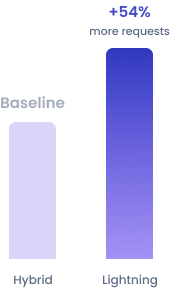
Up to 54% More Uncached Requests
In uncached stress tests, Lightning Stack handled more requests than Hybrid Stack.
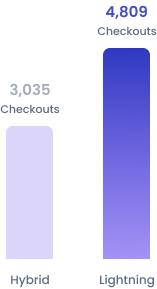
Up to 58% More WooCommerce Checkouts
On 8GB DigitalOcean servers, Lightning Stack completed 4,809 checkouts vs Hybrid Stack’s 3,035.
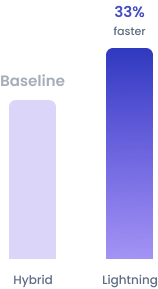
Up to 33% Faster WordPress Admin Loads
WordPress admin pages loaded faster on Lightning Stack, improving dashboard responsiveness.
Benchmark results may vary by workload and server configuration. View independent benchmark results.
Powerful Features to Optimize Website Performance
Speed up and stabilize your site with performance features built into your server, plus additional options you can enable in a few clicks as you grow.
SSD and NVMe Storage
Run websites on SSD or NVMe-backed cloud servers for faster data access and smoother database operations.
Object Cache Pro
Use Redis object caching to reduce repeated database queries and speed up WordPress on eligible plans.

Vertical Server Scaling
Scale RAM, CPU, and storage from your dashboard to support larger workloads as your website grows.

Server & App Monitoring
Monitor server and application performance from your dashboard to identify slowdowns and bottlenecks.
Auto-Healing Servers
Automatically restart failed server services to help maintain website availability and reduce manual troubleshooting.
Multiple PHP Versions
Choose supported PHP versions, including PHP 8.4, for application compatibility and improved runtime performance.

Breeze Cache Plugin
Improve WordPress speed with Cloudways’ free Breeze plugin for page caching, file optimization, and cache management.

Malicious Traffic Filtering
Filter harmful bots and excessive requests at the server level to preserve resources for legitimate visitors.


Real Success Stories. Powered By Cloudways.
Read real-life case studies of companies that used our managed cloud server hosting to take their online businesses to the next level!


Improved site speed by 40% and increased course bookings across AU.
Mo Soltany
Business Development Manager


Cut hosting cost 80% while serving 17M+ users across 160+ countries.
Bryan Feinberg
Founder and CEO


Saw 600% growth, and our homepage achieved a perfect 100% score.
Stephan Eijer
Owner


Managed over $1M in sales and a 200% traffic spike seamlessly.
Sol Lee
Co-founder


Doubled site speed, 20% traffic growth & 50% faster load times.
Great Opomu
Chief WordPress Officer


Scaled to 140+ client sites & hit $1M ARR as performance soared.
Andrew Jackson
Founder & CEO


Streamlined operations for 60+ businesses with reliable performance.
Michelle Coe
President and Senior Creative Director


Saved 25–30% on hosting costs with 40% faster server response time.
Roberto M. Filho
Founder and CEO


30% faster, 280+ sites scaled, $10M+ revenue growth, this year.
Tristan Gatellier
CEO


Achieved 99 PageSpeed score, zero downtime and scalable growth.
Joost Rust
Director


Reduced server costs by 50% and homepage load time dropped to 1.2s.
Florence Luo
Owner and CEO


Grew monthly readership 3x from 3M to 9M after moving to Cloudways.
Simon Treulle
CEO


Improved store speed by 30%, which led to a 22% increase in conversions.
Yogita Khasturi
Co-Founder
Managed over $1M in sales and a 200% traffic spike seamlessly.
Sol Lee
Co-founder


Posted 2.6M views and earned $600K in commissions so rewarding.
Adam Connell
Founder


Handled 20x traffic spikes on 18-year-old site with 5,484 articles.
Jonathan Bailey
Founder


Resulted in a perfect 100% PageSpeed score and 600K page views.
Michael Donovan
Co-founder


Boosted monthly pageviews to 200K, leading to a 6-figure valuation.
Daniel Shuttleworth
Founder


Experienced a 3x increase in traffic and revenue, with 100% speed.
Keith Mint
Founder
Frequently Asked Questions
Which web host is the fastest?
There is no single fastest web host for every website. Speed depends on server resources, caching, website configuration, and visitor location. Cloudways offers high-performance hosting with dedicated server resources, the NGINX-based Lightning Stack, advanced caching, and optional Cloudflare Enterprise CDN to help websites load faster and handle demanding workloads.
How does web hosting affect website speed?
The hosting provider is responsible for how quickly the server will handle requests and deliver website content to visitors. Loading times depend on the CPU, RAM, storage speed, caching, and where the server is located. A slow or overloaded server can delay a response during busy periods.
Cloudways can enhance site speed with its optimized cloud infrastructure, SSD or NVMe storage, caching at the server level, and scaling resources. That said, the design of the site, its images, and plugins will have their own impact on how fast it loads.
How do I know if my hosting provider is slowing down my website?
Run your site through Google PageSpeed Insights or GTmetrix to see what is happening with the server response time (TTFB). If you are seeing performance dips in times of high traffic, or if CPU and RAM usage is high with slow responses, it could be a sign of hosting constraints. Before making the move to another provider, however, make sure to eliminate such factors as large images, heavy plugins, and poor code.
Will switching to faster hosting improve my website speed?
Yes, if your present server is short on resources, has slow response times, or is not well configured.
With Cloudways, you will have the benefit of optimized cloud servers, the Lightning Stack, and advanced caching. Should the need arise, there are ways to add more resources to the server. All of this will see an improvement in page delivery and performance under heavy workloads.
That said, a change in host will not resolve all speed problems. Once the migration is done, you may still have to optimize large images, inefficient plugins, excessive scripts, or poor themes.
Is cloud hosting faster than shared hosting?
Yes, in most cases. For a site that is heavy on resources, cloud hosting will outperform shared hosting. Shared hosting has to spread server capacity across a number of different sites, and that can take a toll on performance during busy periods. With Cloudways, you get dedicated CPU, RAM, and storage, and it allows for scaling as the website expands. That said, performance depends on how the server plan and optimization are set up.
How do I improve my website performance?
The first step is to find out what is slowing your site down. Make sure to optimize any large images, get rid of unnecessary plugins and scripts, turn on caching, and have your software up to date. For a more efficient delivery of content to visitors in different locations, a CDN is worth considering.
Do not overlook the hosting side of things either. With Cloudways, you have access to optimized cloud servers and scaling options that are good for performance. The service includes built-in caching as well as the free Breeze WordPress cache plugin.
It is advisable to run regular tests on the site and monitor resource use to spot any bottlenecks ahead of time.
What affects website performance?
The performance of a site depends on the hosting infrastructure, server response, and location, as well as caching and database efficiency. Large images, overuse of plugins, complex themes, and third-party scripts are factors that tend to increase loading time. Do not overlook the visitor side of things either; network conditions, the visitor’s location, or an unexpected surge in traffic, all of which can affect how promptly the website responds.
How can I reduce server response time?
The first step is to identify the culprits: inefficient caching, an overburdened server, or database queries that are running slowly. From there, you can make improvements by ensuring there is enough CPU and RAM, an optimized PHP setup, and a data center in close proximity to your audience.
Cloudways uses NGINX-powered Lightning Stack, PHP-FPM, and Varnish or Redis for caching to improve request handling. Server monitoring and vertical scaling help address resource-related bottlenecks.
Which tools can I use to measure website performance?
Popular website performance testing tools include Google PageSpeed Insights, GTmetrix, Lighthouse, and WebPageTest. With their aid, you can assess loading speed, identify any resources that are slow to load, and highlight areas where optimization is required.
With Google PageSpeed Insights, you can measure the Core Web Vitals, such as Largest Contentful Paint (LCP), Interaction to Next Paint (INP), and Cumulative Layout Shift (CLS). Time to First Byte (TTFB) can be reviewed as well for an indication of server responsiveness.
For monitoring the server and application, Cloudways has its own built-in solution to spot performance bottlenecks and any issues with resource usage.
What is the best hosting for high-traffic websites?
You should look for hosting that has enough processing power, reliable uptime, good caching, and the ability to scale.
Cloudways has two solutions to meet those demands. With Cloudways Flexible, there are managed cloud servers and vertical scaling; it is the right choice for sites where control of server resources and configuration is needed.
For WordPress or WooCommerce sites prone to unanticipated surges in traffic, Cloudways Autonomous will handle the load balancing and resource scaling automatically while ensuring high availability, all without the need for any hands-on server management.
Can I migrate my website to Cloudways without downtime?
Migration specialists at Cloudways will transfer your site from your current host and keep any disruption to a minimum. An upgrade from your trial entitles you to a free managed migration for WordPress and WooCommerce. In the case of non-WordPress applications, the Standard plan comes with one free managed migration, and the Agency plan covers as many as five.
Will my site slow down during a sale or traffic spike?
If your hosting cannot handle the increased requests, your website can slow down when traffic surges. Performance in busy times is also susceptible to intensive database operations, inadequate caching, or server resources with limited capacity.
Cloudways Autonomous will keep WordPress and WooCommerce responsive as traffic changes by way of load balancing and high availability, automatically provisioning the necessary resources.
With Cloudways Flexible, there is the option to add more resources on the server before any promotion, flash sale, or any other surge you might expect.
What is a good server response time (TTFB)?
The Time to First Byte (TTFB) is the measure of how much time elapses before a browser gets the first byte of a response once a webpage has been requested.
Google’s web performance standards put the benchmark at 800 milliseconds or less for a solid TTFB; they view figures over 1.8 seconds as poor. The lower the number, the more quickly a page will begin to load.
You can improve TTFB with the right combination of optimized hosting, picking the right data center, adequate server resources, and efficient caching. For dynamic website requests, the Cloudways Lightning Stack is built with the aim of enhancing those response times.
Why is my website still slow after using a caching plugin?
While caching plugins are good for accelerating content that can be reused, they do not fix all performance problems. You may still see loading times suffer on account of large images, an overloaded server, and resource-intensive plugins, as well as slow database queries.
The cart and checkout pages on WooCommerce need to be processed dynamically; you will want an optimized hosting stack and Redis object caching to handle them.
Cloudways is built to meet those needs. Its Lightning Stack is optimized for the job and comes with server-level caching and Redis object caching, as well as scalable cloud resources.
Does server location affect website speed?
Yes. Network latency is dependent on the physical distance between your hosting server and those visiting your site, so it has an impact on how fast they are able to access the content. To get better response times, you should host the website in proximity to the main audience.
With Cloudways, you have the option to select data centers from DigitalOcean, Vultr, Linode, AWS, and Google Cloud. For visitors in different regions, the optional Cloudflare Enterprise CDN can further improve content delivery by serving supported cached content from geographically distributed edge locations.
Does website speed affect SEO and Google rankings?
Yes. Website speed contributes to page experience, which Google's ranking systems consider alongside other factors. Google puts forward Core Web Vitals as the standard for loading times, responsiveness, and visual stability. While you can see better performance with faster hosting, the quality and relevance of your content and other elements of SEO are equally important for higher search rankings.