





 Email Hosting
Professional Email Hosting for Your Domain
Host business email on your domain with Rackspace Email on Cloudways. Send and receive email through webmail or your preferred email client.
When Business Email Falls Short, Communication Suffers
As your business grows, managing email across teams, customers, and everyday communication can become more complex.
Generic Email Addresses
Using personal or generic email addresses can make your business look less professional and weaken brand identity.

No Business Mailbox
A domain and website don’t include a business inbox. You still need email hosting for addresses like [email protected]

Limited Email Access
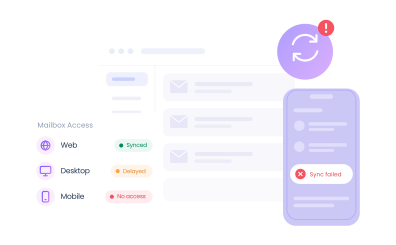
Managing business email is challenging when your mailbox isn’t accessible or synced across web, desktop, and mobile.
Power Better Business Communication With Rackspace Email
Rackspace Email on Cloudways gives you domain-based business mailboxes with the tools you need to send, receive, organize, and access email from wherever you work.
Email Addresses for Every Part of Your Business
Create addresses such as [email protected], [email protected], or [email protected] to keep your business communication tied to your brand.
Get Rackspace Email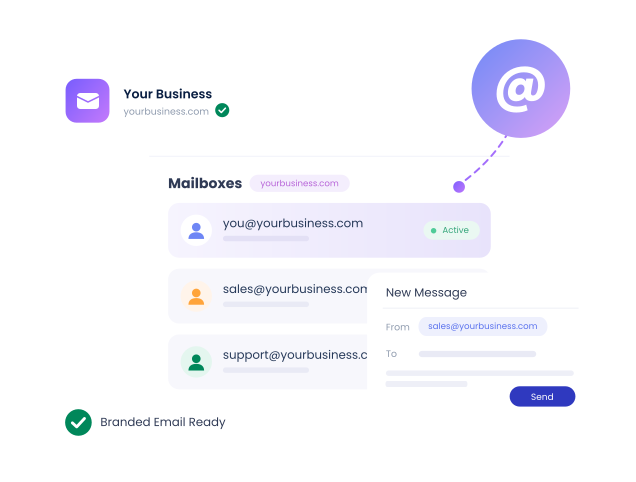
Manage Mailboxes Through Cloudways
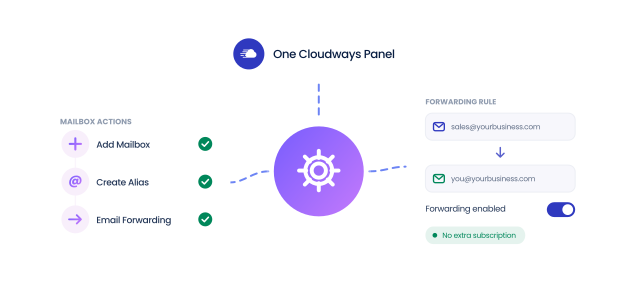
Add mailboxes, create aliases, configure email forwarding, and manage your Rackspace Email service through Cloudways without maintaining a separate Rackspace subscription.
Access Email Wherever You Work
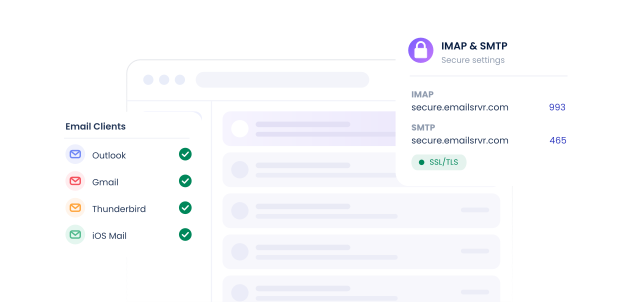
Use Rackspace Webmail in your browser or connect your mailbox to email clients such as Outlook, Gmail, Thunderbird, or iOS Mail using secure IMAP and SMTP settings.
Your Brand in Every Email You Send
Create business email addresses on your domain with Rackspace Email on Cloudways. Get reliable mailbox hosting and flexible email-client support.
- 25 GB storage per mailbox
- Rackspace Webmail access
- 24/7 Cloudways Expert Support
- SSL/TLS-secured connections
- Email aliases and forwarding
- Centralized mailbox management
Rackspace Email Pricing
Domain-based business email for your brand
$1.50
Per mailbox per month
Billed daily based on the $1.50 monthly rate. You only pay for the days your mailbox is active.
Set Up Rackspace Email in 3 Easy Steps
Create your business mailbox and start sending and receiving emails with your domain.
Create Your Mailbox
Log in to Cloudways, go to Integrations > View All > Rackspace Email, and add the mailbox you want to use for your domain.
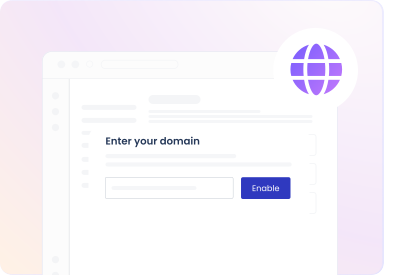
Configure Your Domain
Add the required DNS records for your domain so incoming email is routed to your Rackspace mailbox.
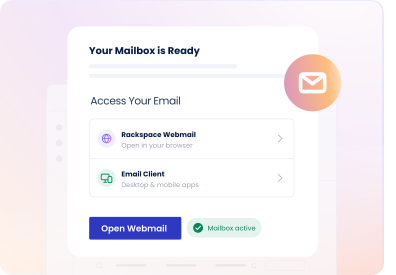
Start Using Your Email
Access your mailbox through Rackspace Webmail or connect it to your preferred desktop or mobile email client.
Everything You Need for Seamless Email Management
Get the essential features to manage business email for your domain.

25 GB Mailbox Storage
Get 25 GB of dedicated email storage with every Rackspace mailbox.

Domain-Based Email
Create professional email addresses on your domain for business communication.

Webmail Access
Send, receive, and manage email directly from your browser with Rackspace Webmail.

50 MB Attachments
Rackspace Email supports attachments up to 50 MB.

Email Client Support
Connect your mailbox to Outlook, Gmail, Thunderbird, iOS Mail, and compatible clients.

Secure IMAP & SMTP
Send and receive email securely and keep your mailbox synchronized across devices.

Contacts & Calendar
Manage contacts, appointments, and calendars in Rackspace Webmail.

Desktop & Mobile Access
Stay connected to your business email from compatible desktop and mobile email clients.

Multiple Mailboxes
Add separate mailboxes for users or teams, each with 25 GB of storage.

Multiple Aliases
Set up multiple aliases on the same domain for an existing mailbox.

Email Forwarding
Automatically forward incoming email from your Rackspace mailbox to another address.

Email Migration
Move your mailbox from another email provider to Rackspace with help from Cloudways.

Multi-Forwarding
Forward email from a mailbox to up to four email addresses.

Keep Forwarded Copies
Choose to retain a copy of forwarded messages in your original Rackspace mailbox.

Cloudways Management
Create mailboxes and manage Rackspace Email aliases and forwarding in Cloudways.

Mailbox Recovery
Restore a deleted mailbox by re-adding it in Cloudways and confirming when prompted.

Spam Protection
Rackspace Email filters unwanted email to help keep spam out of your inbox.

Virus Protection
Built-in virus protection helps identify potentially harmful emails.

Secure Connections
Connect your Rackspace mailbox to clients using SSL/TLS IMAP and SMTP settings.

Email Filtering
Create filters in Rackspace Webmail to route incoming messages to specific folders.

SPF Configuration
Configure the SPF record for your domain as part of your Rackspace Email DNS setup.

DKIM Support
Cloudways Support can assist with adding DKIM records for your Rackspace Email domain.

Safelists & Blocklists
Manage safelists and blocklists in Rackspace Webmail for addresses, domains, or IPs.

Password Management
Change your mailbox password in Rackspace Webmail to help keep your account secure.
Reliable Email. Easy Access. One Platform.
Manage hosting and business email through Cloudways. Create domain mailboxes, use your preferred email client, and manage everything in one place.
Get Rackspace Email
Frequently Asked Questions
What is Rackspace Email hosting?
Rackspace Email is a business email hosting service that lets you create professional email addresses using your own domain, such as [email protected], instead of relying on a personal or generic email address.
With the Rackspace Email Add-on on Cloudways, each mailbox includes 25 GB of email storage and can be accessed through Rackspace Webmail or compatible email clients such as Outlook, Gmail, Thunderbird, and iOS Mail. You can also use secure IMAP and SMTP connections, create multiple aliases, configure email forwarding, and manage your mailboxes through the Cloudways platform.
Rackspace Email is intended for regular business communication where users need individual mailboxes for sending, receiving, storing, and organizing email.
How much does Rackspace Email cost per month?
Rackspace Email on Cloudways costs $1.50 per mailbox per month. Each mailbox includes 25 GB of storage along with webmail access, secure IMAP and SMTP support, email aliases, and forwarding.
Although the service has a fixed monthly rate of $1.50 per mailbox, billing is calculated on a daily basis according to the number of days in the current month. This means you pay only for the days that a mailbox remains active. For example, in a 30-day month, the rate is approximately $0.05 per mailbox per day.
The charge applies to each actual mailbox you create. Creating email aliases for an existing mailbox does not carry an additional charge, so you can have addresses such as [email protected] or [email protected] deliver messages to an existing mailbox without purchasing separate mailboxes for each alias.
If you want Cloudways to migrate an existing mailbox from another email provider to Rackspace, email migration is available separately at $10 per mailbox.
How do I set up Rackspace Email?
You can set up Rackspace Email directly from your Cloudways account. Go to Integrations > View All > Rackspace Email, activate the add-on, and add the mailbox you want to use, such as [email protected]. You can add additional mailboxes later as your team or business requirements grow.
If this is the first Rackspace mailbox being configured for the domain, you also need to update your domain's DNS records so that incoming email is directed to Rackspace. The standard setup includes two MX records pointing to mx1.emailsrvr.com and mx2.emailsrvr.com, an SPF TXT record authorizing Rackspace to send email for the domain, and an autodiscover CNAME record. Cloudways Support can also assist with configuring DKIM for the domain.
DNS changes can take 24–48 hours to propagate, so email routing may not update immediately after the records are added.
Once the mailbox and DNS records are configured, you can access your email through Rackspace Webmail or connect the mailbox to a compatible desktop or mobile email client using the Rackspace IMAP and SMTP settings. You can also manage features such as aliases and email forwarding through the Rackspace Email Add-on in Cloudways.
Can I use Rackspace Email with Outlook?
Yes. Rackspace Email can be connected to Microsoft Outlook using secure IMAP and SMTP settings, allowing you to send and receive mail from your Rackspace mailbox directly through Outlook.
For incoming email, configure the account as IMAP using secure.emailsrvr.com on port 993 with SSL/TLS. For outgoing email, configure SMTP using secure.emailsrvr.com on port 465 with SSL/TLS. Your complete Rackspace mailbox address and mailbox password are used as the login credentials, and SMTP authentication should be enabled using the same credentials.
IMAP is used to receive and synchronize emails between the Rackspace mail server and Outlook, so actions such as reading, moving, or deleting messages can remain synchronized across compatible devices. SMTP is used to send outgoing emails from your Rackspace mailbox through Outlook.
Rackspace Email can also be configured with clients such as Gmail, Thunderbird, and iOS Mail, so you are not limited to using Outlook or Rackspace Webmail.
What are the IMAP and SMTP server settings for Rackspace Email?
For secure email-client access, use the following Rackspace Email settings:
- Account type: IMAP
- Incoming mail server: secure.emailsrvr.com
- IMAP port: 993
- IMAP security: SSL/TLS
- Outgoing mail server: secure.emailsrvr.com
- SMTP port: 465
- SMTP security: SSL/TLS
- Username/Login: Your complete Rackspace mailbox email address
- Password: Your Rackspace mailbox password
- SMTP authentication: Enabled, using the same credentials as the incoming server
IMAP is used to receive and synchronize messages between the Rackspace server and your email client, while SMTP handles outgoing email. Because IMAP keeps messages on the mail server, the same mailbox can stay synchronized when accessed from multiple compatible devices.
These settings can be used when manually configuring supported clients such as Outlook, Thunderbird, Gmail, or iOS Mail. After configuration, send a test message and confirm that both incoming and outgoing email are working correctly.
What is Rackspace Webmail?
Rackspace Webmail is the browser-based interface for accessing your Rackspace Email mailbox. It allows you to use your business email without installing or configuring a separate desktop or mobile email application.
Through Webmail, you can send, receive, organize, and search your messages as well as manage contacts, appointments, meetings, and calendars. It also provides mailbox-management features such as email signatures, filters, forwarding, spam settings, safelists and blocklists.
Webmail is particularly useful when you need to access your mailbox from a browser or a device where your regular email client is not configured. You can still connect the same mailbox to applications such as Outlook, Gmail, Thunderbird, or iOS Mail through IMAP and SMTP if you prefer to manage email through an email client.
Can I use Rackspace Email for transactional emails?
No. Rackspace Email is designed primarily for mailbox-based business communication, such as sending and receiving messages through addresses like [email protected], [email protected], or an individual employee's business email address.
It is not intended for mass-volume transactional email generated automatically by websites or applications. This includes messages such as ecommerce order confirmations, password resets, account notifications, form notifications, and other automated application emails.
For these types of messages, use a dedicated transactional email service instead. Cloudways provides options such as the Elastic Email Add-on or the Custom SMTP Add-on, which are designed for application-generated outgoing email.
You can therefore use Rackspace Email for your employees' or teams' regular inboxes while separately configuring a transactional email service for automated emails generated by your website or application.
Is Rackspace Email included with Cloudways hosting?
No. Rackspace Email is a separate email hosting add-on and is not automatically included with a Cloudways hosting plan.
Cloudways hosting provides the infrastructure for hosting your website or application, while Rackspace Email provides the mailboxes required to send and receive regular business email using your domain. Having a website and domain on Cloudways therefore does not automatically create an email inbox for addresses such as [email protected].
You can activate Rackspace Email separately through Cloudways and add as many individual mailboxes as you require. Each mailbox costs $1.50 per month, billed daily based on the number of days the mailbox is active, and includes 25 GB of mailbox storage.
Once activated, mailboxes, aliases, and forwarding can be managed through Cloudways without requiring a separate Rackspace subscription.
Do I need to configure DNS records for Rackspace Email?
Yes. If you are setting up Rackspace Email for your domain for the first time, you need to configure the appropriate DNS records so email servers know where to deliver messages sent to your domain and so Rackspace is authorized to send email on its behalf.
The standard Rackspace Email configuration includes:
- MX record: mx1.emailsrvr.com with priority 10
- MX record: mx2.emailsrvr.com with priority 20
- SPF TXT record: v=spf1 include:emailsrvr.com ~all
- Autodiscover CNAME: autodiscover.emailsrvr.com
The MX records route incoming email for your domain to the Rackspace mail servers. The SPF record authorizes Rackspace as an approved sender for your domain, while the autodiscover record helps compatible email clients identify the correct email service configuration.
Cloudways Support can also assist with DKIM configuration, which adds another layer of email authentication.
After you add or modify the DNS records, allow time for the changes to propagate. DNS changes can take 24–48 hours to propagate across the network, although they may become active sooner depending on your DNS provider and existing TTL settings.Can I access my Rackspace mailbox on multiple devices?
Yes. You can access the same Rackspace mailbox from multiple compatible computers, phones, tablets, and email clients. Rackspace Email uses IMAP for incoming email, which keeps messages stored on the mail server and synchronizes mailbox activity across connected clients.
For example, if you read, move, or organize a message in a compatible IMAP email client on one device, those changes can be reflected when you access the same mailbox from another connected device.
You can connect the mailbox to applications such as Outlook, Gmail, Thunderbird, and iOS Mail using secure.emailsrvr.com. For incoming email, use IMAP port 993 with SSL/TLS. For outgoing email, use SMTP port 465 with SSL/TLS, with SMTP authentication enabled using your full Rackspace email address and mailbox password.
You can also access the same mailbox directly through Rackspace Webmail from a browser, giving you another way to manage email when your usual desktop or mobile email client is unavailable.