





Free WordPress Migration Plugin For Effortless Migrations.
Use our free WP migration plugin for a hassle-free transition. With our expert human support and no costs involved, we’ll handle the hard work while you build an exceptional website.
No Credit Card Required
Migrate Your WordPress Site
in 3 Easy Steps.
Carry unlimited site migrations with the WordPress Migrator plugin for a quick and stress-free experience.

Install the Plugin
Get started by installing and activating the Cloudways free WordPress Migration plugin.

Connect Cloudways Server
Fill in the server credentials in the Cloudways panel.

Migrate Your Website
Initiate the migration process and track progress until it’s done successfully.
Why Migrate to Cloudways
Hosting for WordPress?
Because you want a hosting provider that’s reliable, fast, secure, and always available.
Speed
We have partnered with the leading cloud providers to ensure 99.99% uptime and loading speeds of 200–400 milliseconds.
Security
Stay protected with end-to-end encryption, free SSL certification, two-factor authentication, and advanced DDoS attack mitigation with Cloudflare Enterprise.
Support
Cloudways’ 96% CSAT speaks volumes about its best-in-class support, which includes 24/7 access to a team of experts.
Scalability
No page loading delays during traffic spikes or when your site grows. Scale up with ease when you need additional resources.
Pricing
Simple & clear pricing plans. No website or visitor caps, overage charges, or no renewal costs. Just pay for what you use.
Maintenance
Expert maintenance, including updates, security checks, and performance optimization for your server.
Pay-as-You-Go Plans That Adapt to Your Budget.
Pick up a cloud hosting plan that you can always scale up/down to optimize operational costs.
Managed Node.js hosting for full-stack apps, APIs & automation. No cold starts, Git-based deployments, and flat, predictable monthly pricing.
Starter
$20
$20
/Month- 2GB RAM
- 2 vCPU
- 5 Apps
- 3 TB Server Bandwidth
- 250 GB CDN Bandwidth
- 10 Gbps Network
Features Included
 Enterprise CDN
- DDoS Protection
- Malware Protection
Professional
$30
$30
/Month- 4GB RAM
- 2 vCPU
- 8 Apps
- 4 TB Server Bandwidth
- 400 GB CDN Bandwidth
- 10 Gbps Network
Features Included
- Enterprise CDN
- DDoS Protection
- Malware Protection
Growth
$50
$50
/Month- 8GB RAM
- 4 vCPU
- 14 Apps
- 5 TB Server Bandwidth
- 700 GB CDN Bandwidth
- 10 Gbps Network
Features Included
- Enterprise CDN
- DDoS Protection
- Malware Protection
Scale
$100
$100
/Month- 16GB RAM
- 8 vCPU
- 30 Apps
- 6 TB Server Bandwidth
- 1200 GB CDN Bandwidth
- 10 Gbps Network
Features Included
- Enterprise CDN
- DDoS Protection
- Malware Protection
Plus
$150
$150
/Month- 32GB RAM
- 8 vCPU
- 50 Apps
- 7 TB Server Bandwidth
- 1500 GB CDN Bandwidth
- 10 Gbps Network
Features Included
- Enterprise CDN
- DDoS Protection
- Malware Protection
Advanced
$300
$300
/Month- 48GB RAM
- 12 vCPU
- 100 Apps
- 8 TB Server Bandwidth
- 3000 GB CDN Bandwidth
- 10 Gbps Network
Features Included
- Enterprise CDN
- DDoS Protection
- Malware Protection
Business
$400
$400
/Month- 64GB RAM
- 16 vCPU
- 150 Apps
- 9 TB Server Bandwidth
- 4500 GB CDN Bandwidth
- 10 Gbps Network
Features Included
- Enterprise CDN
- DDoS Protection
- Malware Protection
Upgrade or downgrade anytime no lock-in.
A charge of $0.033/GB applies to offsite backup storage.
A charge of $0.02/GB applies to any CDN bandwidth used beyond your plan's allocation.
An additional charge of $1/10GB disk storage applies.
0%
Deploy OpenClaw or Hermes on secured and managed infrastructure in minutes. No manual setup required.
Scout
Light reconnaissance, one or two simple workflows
$9.99
$9.99
/Month
- 1 vCPU
- 2GB RAM
- 50GB Storage
- 2TB Bandwidth
Operator
Active single-purpose agent doing real work
$19.99
$19.99
/Month
- 2 vCPU
- 4GB RAM
- 80GB Storage
- 3TB Bandwidth
Recommended
Launch Your Agent
Squad
Multiple sub-agents coordinating on tasks
$39.99
$39.99
/Month
- 4 vCPU
- 8GB RAM
- 160GB Storage
- 5TB Bandwidth
Swarm
Many agents, many tools, always-on autonomy
$79.99
$79.99
/Month
- 8 vCPU
- 16GB RAM
- 320GB Storage
- 6TB Bandwidth
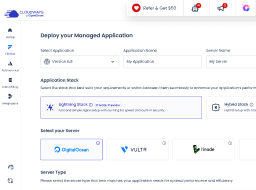
Select Cloud Provider
-
Fastest growing & affordable cloud provider with high-performance SSD standard and NVMe storage premium servers across 9 locations. Select the perfect fit from their Basic, General Purpose, and CPU Optimized server lineup.
DigitalOcean
-
Across 30 locations, Vultr provides standard servers featuring SSD storage and high frequency servers with NVMe storage powered by the fastest architecture available in the Vultr product lineup.
Vultr
-
Popular cloud emphasizing consistent performance across 25 datacenters. Choose Linode if you wish top quality performance at a pocket—friendly budget.
Linode
-
Flexible Amazon cloud compute (EC2) with configurable storage/bandwidth across 28 datacenters. AWS supports dynamic vertical scaling with options to both upgrade and downgrade server resources. Select the perfect fit from their Standard and Compute Optimized server lineup.
AWS
-
Google Compute Engine (GCE) is an extremely powerful cloud hosting infrastructure with the efficient performance that comes with Google's brand name. With 28 datacenters, GCE supports dynamic vertical scaling with options to both upgrade and downgrade server resources. Select the perfect fit from their Standard, Compute Optimized and High Compute server lineup.
GoogleCloud
Select Server Type
-
Basic
DigitalOcean is the fastest growing cloud provider.
-
General Purpose
DigitalOcean is the fastest growing cloud provider.
-
CPU Optimized
DigitalOcean is the fastest growing cloud provider.
-
Standard
DigitalOcean is the fastest growing cloud provider.
-
Standard
DigitalOcean Standard Droplets, powered by 2nd generation or earlier Intel CPUs and standard SSD, are perfect for general-purpose workloads and all your applications, offering networking speeds up to 2 Gbps.
-
Premium
DigitalOcean Premium Droplets are powered by 2nd or 3rd Generation Intel Xeon Scalable processors and faster NVME storage delivering higher network throughput up to 10 Gbps for your most demanding applications.
Micro
Suitable for personal websites and simple blogs.
$14
$14
USD per month
You pay $0.0208 hourly
- 1GB RAM
- 1 vCPU
- 25GB NVMe Storage
- 1TB Transfer Bandwidth
- 4 Free AI Copilot Credits
-
Lightning Stack


- Unlimited Visits
- Unlimited Websites
Small
Suitable for growing businesses and moderate traffic.
$28
$28
USD per month
You pay $0.0417 hourly
- 2GB RAM
- 1 vCPU
- 50GB NVMe Storage
- 2TB Transfer Bandwidth
- 4 Free AI Copilot Credits
-
Lightning Stack
- Unlimited Visits
- Unlimited Websites
Most Popular
Medium
Supports more demanding websites with higher traffic.
$54
$54
USD per month
You pay $0.0804 hourly
- 4GB RAM
- 2 vCPU
- 80GB NVMe Storage
- 4TB Transfer Bandwidth
- 4 Free AI Copilot Credits
-
Lightning Stack
- Unlimited Visits
- Unlimited Websites
Large
Ideal for e-com stores and resource-intensive applications.
$11
USD per month
You pay $0.1473 hourly
- 8GB RAM
- 4 vCPU
- 160GB NVMe Storage
- 5TB Transfer Bandwidth
-
4 Free
 AI Copilot Credits
-
Lightning Stack
- Unlimited Visits
- Unlimited Websites
$0.033/GB per server will be applied for offsite backup storage.
Fully managed hosting for WordPress for dynamic high traffic eCom and LMS sites, built to autoscale for thousands of concurrent users.
Free Trial
Try Autonomous' simplicity and autoscaling before committing.
$100
$0For 3 Days


Plan Includes
Website: 01
Baseline Autoscale Servers: 01
Bandwidth: 150 GB
Disk space: 20 GB
Visits: Unmetered
PHP Workers: 100/server
Features Included
True Autoscaling
Cloudflare Enterprise CDN
Redis Caching
Object Cache Pro + Relay
 Free Managed Migration
Growth
For applications with growing traffic needs.
$100
$99/Month
Plan Includes
Website: 01
Baseline Autoscale Servers: 01
Bandwidth: 150 GB
Disk space: 20 GB
Visits: Unmetered
PHP Workers: 100/server
Features Included
True Autoscaling
Cloudflare Enterprise CDN
Redis Caching
Object Cache Pro + Relay
Free Managed Migration
Additional Charges
- Disk Space: $1/GB
- Bandwidth: $0.04/GB
- Autoscaling: $0.07/hr/server beyond baseline
Recommended
Scale
For applications managing consistent traffic growth.
$100
$199/Month
Plan Includes
Website: 01
Baseline Autoscale Servers: 02
Bandwidth: 250 GB
Disk space: 50 GB
Visits: Unmetered
PHP Workers: 100/server
Features Included
True Autoscaling
Cloudflare Enterprise CDN
Redis Caching
Object Cache Pro + Relay
Free Managed Migration
Additional Charges
- Disk Space: $1/GB
- Bandwidth: $0.04/GB
- Autoscaling: $0.10/hr/server beyond baseline
Plus
For large scale applications with critical traffic needs.
$100
$399/Month

Plan Includes
Website: 01
Baseline Autoscale Servers: 03
Bandwidth: 1000 GB
Disk space: 100 GB
Visits: Unmetered
PHP Workers: 100/server
Features Included
True Autoscaling
Cloudflare Enterprise CDN
Redis Caching
Object Cache Pro + Relay
Free Managed Migration
Additional Charges
- Disk Space: $1/GB
- Bandwidth: $0.04/GB
- Autoscaling: $0.12/hr/server beyond baseline
Enterprise
Need more than standard plans? We’ll create a custom plan.
Custom
Optimized resources for your traffic and usage patterns.
Custom resource allocation and baseline capacity.
Expert consultation to match plan to requirements.

Have Complete Peace of Mind with Our Free Migration.
In addition to our free WP migration plugin, enjoy ONE free migration handled by our experts. Simply open a support ticket, and we’ll cover the rest. Our support team is available 24/7/365, and you can enhance your experience even further with our optional Advanced support add-on.
Migrate NowFree Migrations
Drive Traffic to Websites Without
Any Fears of Downtime.
This high-availability hosting adapts to your business in real-time with its autoscaling, so you can enjoy peace of mind while focusing on your most important tasks, delivering results, and staying competitive.
The Cloudways WordPress Migrator plugin is reliable and has been tested on hundreds of hosting environments. Plus, it’s FREE! And if there are any hiccups, we’ve got your back.
Expedite your web apps with Cloudways ThunderStack – a powerful combination of Apache, Nginx, Varnish, and Memcached (with optional Redis), to experience lightning-fast website performance.
Need advice on your website hosting infrastructure? Our platform offers automated recommendations based on your pageviews data. Also, our proficient cloud engineers are always available to ensure your hosting setup is optimized for success.
Worried about bugs during migration? Don’t fret. Our cloud experts will keep your website intact while moving to Cloudways, so you can migrate with confidence.


Freelance Developers, Design Professionals
& Marketers Love Cloudways.
With Cloudways, you can host unlimited websites on one server. You only pay for
what you use, saving additional costs—no plugin restrictions.
Freelancer
Specify is the perfect addition to our front-end boilerplate. Tokens, assets, fonts. Everything come straight out from Figma. Less configuration, more creative development. Our team loves it.

Gabriel Marcolongo
Founder at Incluyeme
Ecommerce
Tried many plugins but real speed never really improved. Moved to Cloudways and I’m amazed at REAL speed improvements, and so the transfers begin!

Jamie Knop
@JamieKnop
Agency
I am using DigitalOcean Plan in Cloudways and I can confirm it is very good. Also, additional the backup with my hosting is awesome too.

Suraj Katwal
Freelancer
The site’s loading time was greatly improved… I have a total of 14 clients on the platform and am in the process of migrating more.

Jyll S
President and Founder
Ecommerce
Cloudways is super easy, super fast and cost effective (we run 5 sites on a single instance for 40$/month!)

Elad Levy
@mrlevyelad
Agency
Excellent option for those looking for High-End WordPress Hosting. I have been using Cloudways for two years and the performance in amazing.

César R
Small-Business Owner
Freelancer
@cloudways
Can’t believe how much faster my WP site is after switching… not
even close to my old host. So important w/ Google’s new SEO rules.

Kristen
@hikristennn
Ecommerce
Cloudways has fulfilled our expectations. It is a great service and keeps our website up and running nicely.

Amit Kothari
Founder at Tallyfy
Freelancer
I love that Cloudways has made cloud hosting available to non-technical IT people like myself…the new website was up and running within a few hours.

Chris A
Photography
Agency
Digital agencies like ours get to have multiple servers from different providers in one place.

John Falzon
Managing Director at Keen
Ecommerce
Gamechanger… completely elevated my ability to service my clients. Their support staff are extremely knowledgeable and the platform offers all the flexibility and scalability.

Walter
Kreetiv Studio
Freelancer
I wish I had discovered @Cloudways earlier. Their services and support are just amazing!

Jan Tegze
@jantegze
Agency
A simple management dashboard, combined with amazing chat support, reduces costs for outsourced server ops services.

Bet Hannon
CEO BH Business Websites
Ecommerce
Cloudways is strangely fast, literally. I mean, I don’t know why but it’s just fast.

Nathan
@zartre
Convenience With Cloudways.
Migrate your site seamlessly with the best WordPress Migration Plugin.


Frequently Asked Questions
How do I migrate my WordPress site for free?
There are a few ways to migrate your WordPress site for free, including using a manual approach or a free migration plugin, i.e., Cloudways WordPress Migrator plugin. At Cloudways, you get one free migration handled fully by our experts without breaking your site.
How do I migrate a WordPress website using plugins?
You can migrate unlimited WordPress websites on Cloudways using the free Cloudways WordPress Migrator plugin.
Here's how you can use the migration plugin to migrate your WordPress sites:
- Go to your WordPress dashboard.
- Click Plugins > Add New.
- Search for the "Cloudways WordPress Migrator" plugin.
- Install & activate the plugin.
- Now click on the plugin, and enter your email address.
- Agree to the terms & conditions and click Migrate.
- Enter your Destination Site URL.
- Enter your SFTP Host/Server Address & Database Name.
- Click Migrate to migrate your WordPress site.
What is the best migration plugin for WordPress?
The Cloudways WordPress Migrator Plugin is considered among the best migration plugins for WordPress for several reasons:
- It’s easy to use, even for beginners with limited technical knowledge.
- It helps you seamlessly migrate your site files and database, ensuring your site is fully replicated on your new hosting account.
- It lets you carry quick and efficient migrations with minimal downtime.
- Unlike other migration plugins, it offers a very secure migration process and generates secure access & secret keys for your site protection during migration.
Overall, the free WordPress Migration Plugin by Cloudways offers a comprehensive, secure, and easy-to-use solution for WordPress website migrations.
Why should I migrate a WordPress website to a new host?
You may want to migrate a WordPress website to a new host for several reasons, including poor website performance, inadequate support from your current host, or the need for more resources or scalability. Also, migrating to a managed host like Cloudways will considerably improve your website's speed, reliability, and security after migration.
How does Cloudways migrate a WordPress website?
Cloudways provides two easy ways to migrate your WordPress website:
- Asking the Cloudways support for migration.
- Using the Cloudways WordPress Migrator plugin.
It’s worth noting that Cloudways offers one free migration carried by its support experts without breaking your sites. Or you can always use the WordPress migration plugin by Cloudways to carry unlimited site migrations for free.
Are there any restrictions when I migrate to the Cloudways platform for hosting my WordPress apps?
No, Cloudways does not impose any restrictions on its website migrations. You can safely migrate from any hosting platform to Cloudways without any hassles.
How long does a website migration take, and how does Cloudways ensure website security during the process?
The time it takes to migrate a website can vary depending on several factors, such as website size, complexity, and migration method.
However, using the Cloudways WordPress Migrator Plugin can significantly reduce the migration time, typically taking less than an hour. Cloudways implements several security measures, like generating secure access and secret keys, providing safe server environments, and SSL encryption to ensure website security during migration.